
すべて · 図解・案内 · 店舗案内
262ハロウィンのお菓子プレゼント案内板 — 「お菓子をもらってね」お店の入口用
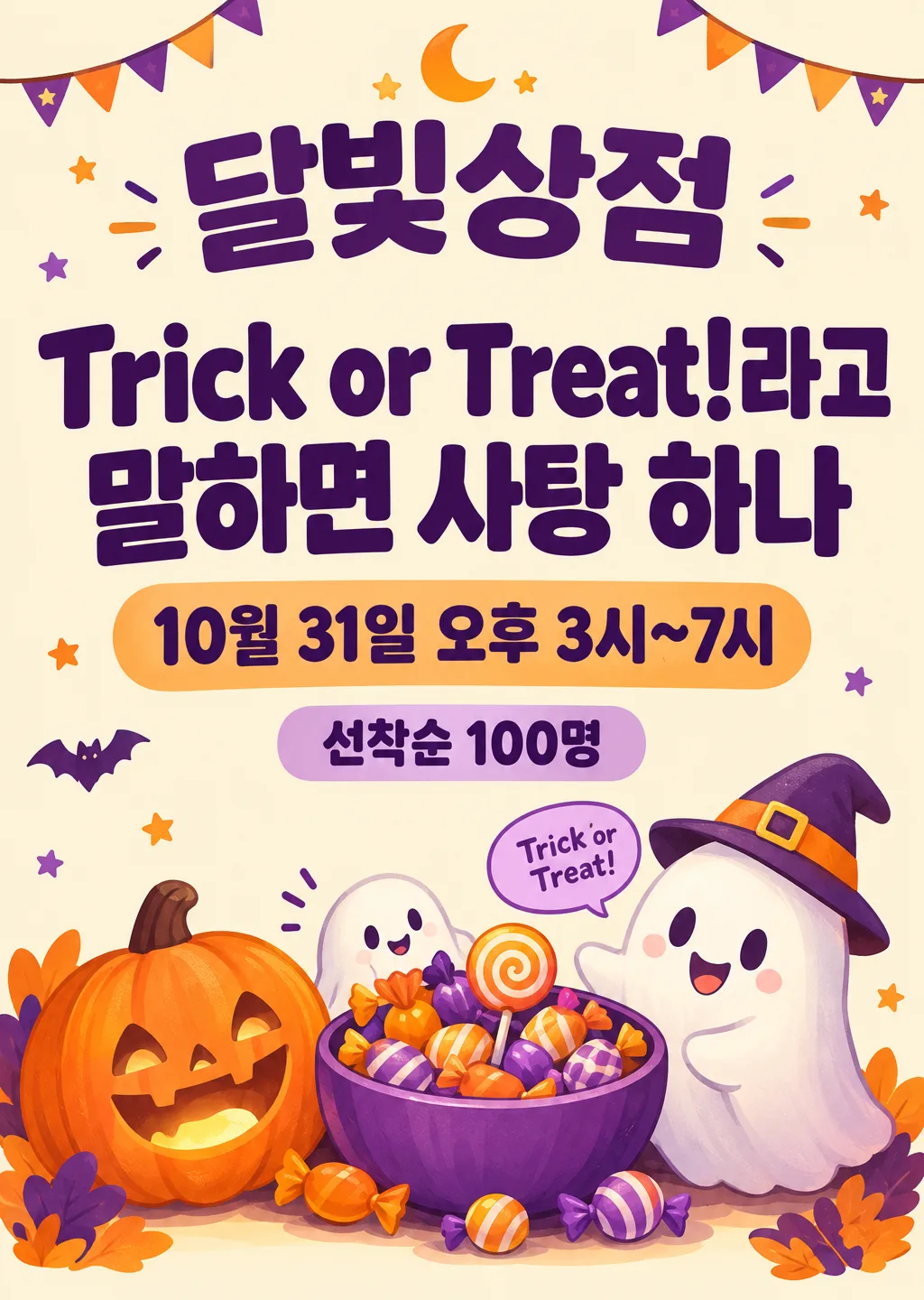
店名・配る日時を入れるだけで、子どものお客さんにお菓子を配るかわいいハロウィン案内板に。「Trick or Treat!」と言えばお菓子ひとつ!
ChatGPT 無料 OK
項目を入力
- 1項目を入力します
- 2コピーを押します
- 3GPTのチャットに貼り付けます
- 4そのまま送ると、サムネイルの例のような画像になります
- 5カードに合う実際の写真を一緒に入れると反映されます。背景カードなら背景の写真、人物・料理カードならその写真 任意
プロンプト全文を見る 9,247文字
Generate this image now. Draw it directly - do not describe it, explain it, or ask questions.
出力サイズは2480×3508ピクセル、A4縦、300dpiの印刷用ポスターにしてください。
PHOTO RULE (this overrides any other line in this prompt, before or after it, that calls the photo required or mandatory or says to ask for it): if a photo is attached, use it exactly as the instructions below describe. If no photo is attached, never ask for one and never stop — invent a fitting fictional subject (person, pet, food, product or place, whatever this card is about) in the spirit of the card's example image, and finish the image.

[One shop entrance sign; define the actual offer first]
Create exactly ONE friendly professional A4 portrait Halloween candy-giveaway sign for a shop entrance or counter. The shop name and the owner's complete collection instruction are the two biggest text elements. Use the canvas on line two, defaulting to A4 portrait. Render the finished sign flat and straight on, not a photo of an easel, storefront, candy package, phone screen, mockup or multiple alternative designs.
SHOP_NAME = "【店名】". Print the complete supplied shop name exactly once, prominently.
DATE_TIME = "【配る日時】". Print the complete supplied date and time exactly once; no automatic extra year, weekday or changed hours.
CLAIM = "【もらい方】". This is the authoritative complete instruction for receiving candy, rendered verbatim once as the largest message. Never rewrite its password, number of sweets, recipient category or required action.
PASSWORD = "【合言葉】". This optional choice may appear as a small friendly ghost speech bubble only when it adds a compatible greeting not already contained in CLAIM. If CLAIM already contains this password, including a punctuation variant, do not print a duplicate bubble. If CLAIM explicitly states a different password, omit the conflicting bubble and preserve CLAIM exactly. Never create a second eligibility rule or change CLAIM to match this selector.
CONDITION = "【数・条件】". If absent, add no quantity or eligibility condition. Otherwise print the exact supplied wording once in a clearly readable supporting line.
PALETTE = "【色】". If absent, use orange and purple with a warm cream base. Yellow/black uses warm yellow, near-black and clean off-white; pastel uses pale peach, lavender and mint with dark plum lettering for contrast. This selected color direction replaces the other palettes throughout.

[Fallbacks for absent input lines]
When an optional named input line is absent, resolve PALETTE to orange/purple on warm cream. PASSWORD and CONDITION are absent unless their own lines are supplied. Active lines above always take precedence over this fallback map.

[Input resolution]
Resolve the named inputs BEFORE planning the image. An optional input exists only when its own input line is supplied; blank values and "選ばない" mean absent. "おまかせ" are automatic-choice MENU COMMANDS, never visible copy: choose a fitting concrete result yourself. Never print a selector, field label, these commands, or placeholder braces. Defaults apply only to absent inputs. A supplied choice replaces its corresponding default everywhere; subsequent scene descriptions refer to the resolved named value, never to a competing fixed default.
Only SHOP_NAME, DATE_TIME, CLAIM, active CONDITION and a nonduplicate compatible PASSWORD may become visible words. No extra fixed headline, invented slogan, participation step, admission fee, purchase minimum, age cutoff, costume requirement, candy quantity, allergy assurance, opening hour or stock disclaimer. The owner determines the offer. A supplied condition is genuine content; blank space is not permission to add terms. Never translate, shorten or paraphrase the receiving instruction just to fit the design.

[Design and distant readability]
Make a cohesive retail event sign with abundant clear lettering, cheerful original illustrated characters and a warm dense visual base. Build its identity from two strong type masses and one integrated candy scene, not a grid of tiny information cards or scattered stationery icons. Keep page-edge print margins of at least 8 mm. Keep essential text below the top 12% and above the bottom 15% so a listing overlay also leaves it visible. The background is mostly warm cream or a very pale selected tint with dark lettering; colorful shapes and illustration accents carry the festive palette. Avoid patterned backgrounds underneath any essential sentence.

At approximately y=15-24%, SHOP_NAME spans about 80-88% of the width, using a thick clean rounded Korean sans-serif or equally legible original-language display face. It should be the second-largest text mass, visibly naming the shop from a distance. Set CLAIM around y=29-52% in the largest heavy type, using two or three substantial meaning-preserving lines with compact balanced spacing. Break only at natural word boundaries; keep the Korean particles with their words and keep a number with its unit. Aim for the main sentence to remain readable from two to three meters on an A4 print. Give it the strongest contrast and no playful letter distortion. Never omit the words specifying exactly who receives how many candies.

At approximately y=56-64%, render DATE_TIME in a distinct bold supporting line or two lines if necessary, still large enough for a customer to read without stepping close. CONDITION, when active, sits directly below around y=66-71%, smaller than the date but in firm readable type, not tiny gray legal copy. For a short CONDITION use a simple low-contrast horizontal color band integrated into the sign; for a longer one use calm open background and a natural line break. Do not add "date", "conditions" or other field labels. Use these normalized regions as a hierarchy, adjusting gently for longer real inputs while keeping all required wording and avoiding the protected margins.

[Original candy scene, subordinate to the instructions]
Place a compact appealing illustration around the lower right and lower center, mainly y=70-94%, with supporting accents at the sides of the large type. Draw one generous round bowl of loose candies, a warm smiling ribbed pumpkin lantern and one small friendly ghost leaning toward the bowl with an inviting gesture. A second tiny ghost may peek around the bowl if it improves the composition, without adding another text phrase. Use layered scale, precise overlaps, believable rounded volume, little reflected light and clean confident contours to give the illustration substantial crafted detail. Keep pumpkin, ghost and candy as a connected vignette with a shared grounding shadow, not three unrelated sticker icons. Their edges may overlap empty background beside the main type, but must never cover a letter, date, time, number or condition.

Candies are original unbranded shapes: loose striped round sweets, soft twist-wrapped candies with plain color wrapping and one simple spiral lollipop. No logo, manufacturer mark, commercial wrapper layout, branded colors arranged as a recognizable package, snack name, ingredient text, barcode, invented product label or readable packaging lettering. The pumpkin has a happy carved face and warm internal light; the ghost is rounded and nonthreatening. Render the illustration in a polished contemporary gouache-like cartoon medium with soft dimensional shading, distinct material detail and crisp silhouette edges. Keep all creatures newly invented, with no imitation of entertainment characters or famous monsters.

[Optional password bubble and typography discipline]
If the resolved PASSWORD genuinely adds a compatible separate greeting, use one small speech bubble near the ghost around y=73-81%, printing that phrase verbatim once. Suppress the bubble entirely when the password is already in CLAIM, instead of adding repeated lettering or an empty bubble. This decoration must remain smaller than DATE_TIME and CONDITION. Do not turn it into an alternate instruction, and never let it take priority over the owner's exact receiving sentence. Whenever the supplied CLAIM already contains the resolved password, the claim sentence is its sole appearance; no duplicate speech bubble is allowed.

[Exact offer and final check]
Inspect every Hangul syllable, digit, punctuation mark, tilde, exclamation mark, spacing and time expression against the resolved inputs. Preserve the quantity in CLAIM and any limit in CONDITION; do not infer a different number from the illustrated bowl. SHOP_NAME and CLAIM must be readable first, DATE_TIME next, CONDITION next, with illustrations supporting this order. Check strong contrast, robust type weight, safe print margins and no obscured words. All text must be supplied content and appear once. No automatic-choice commands, form labels, real-film homage, trademarks, candy packaging text, blood, wounds, injury, watermark, signature or explanatory answer. Return one finished print-ready Halloween giveaway sign.

[Final output format]
出力サイズは2480×3508ピクセル、A4縦、300dpiの印刷用ポスターにしてください。
This selected output format takes priority over any fixed canvas size or aspect ratio elsewhere in this template. Adapt the composition, text zones and margins to the selected canvas without stretching or cropping essential content. Device safe areas apply only when a device is selected. Never print these format instructions on the image.
結果はどうでしたか?
こちらのカードも人気です
使い方・よくある質問
こんなときに
ハロウィンに近所の子どもたちへお菓子を配りたいお店で使ってください。「Trick or Treat!と言えばお菓子ひとつ」のように、もらい方がひと目でわかるかわいい案内板です。子どものお客さんが来て、一緒に来た保護者もお店をもう一度見てくれる、小さなイベントになります。お菓子代数千円で、近所にお店の名前を知ってもらえます。
項目の入れ方
店名・配る日時・もらい方の3つは必ず書いてください。もらい方は案内板でいちばん大きく見える文なので、短いほどいいです。「先着100名」「お菓子がなくなり次第終了」などの条件を書くと下に小さく入り、行列が長くなってもトラブルになりません。
確認すること
- 日付・時間・条件の文字は入力どおりですか?
- お菓子の商品名やパッケージの文字が入っていませんか?特定の商品の広告に見えないようにしています
- 遠くからでも、もらい方の文が読めますか?
直したいとき
同じ会話で一つずつ頼んでください。「もらい方の文字をもっと大きく」「おばけをもう一つ」「時間を午後4時〜8時に」のように。
よくある質問
- アレルギーが心配です。 条件の欄に「ナッツを使っていないお菓子です」のように書くと、案内板に一緒に入ります。実際に配るお菓子の成分はご自身で確認してください。