
項目を入力
- 1項目を入力します
- 2プロンプトをコピーします
- 3GPTのチャットに実際のバーガー写真一枚とプロンプトを一緒に送ります
- 4写真と文章の両方が入っていることを確認します
プロンプト全文を見る 6,416文字
Generate this image now. Draw it directly - do not describe it, explain it, or ask questions.
A3横、420×297mm、縦横比1.414:1のポスターを1枚作成してください。生成できる最大解像度を使い、印刷用の最終目標は4961×3508ピクセル、300dpiです。文字は紙の端から10mm以上内側に置いてください。

[Purpose]
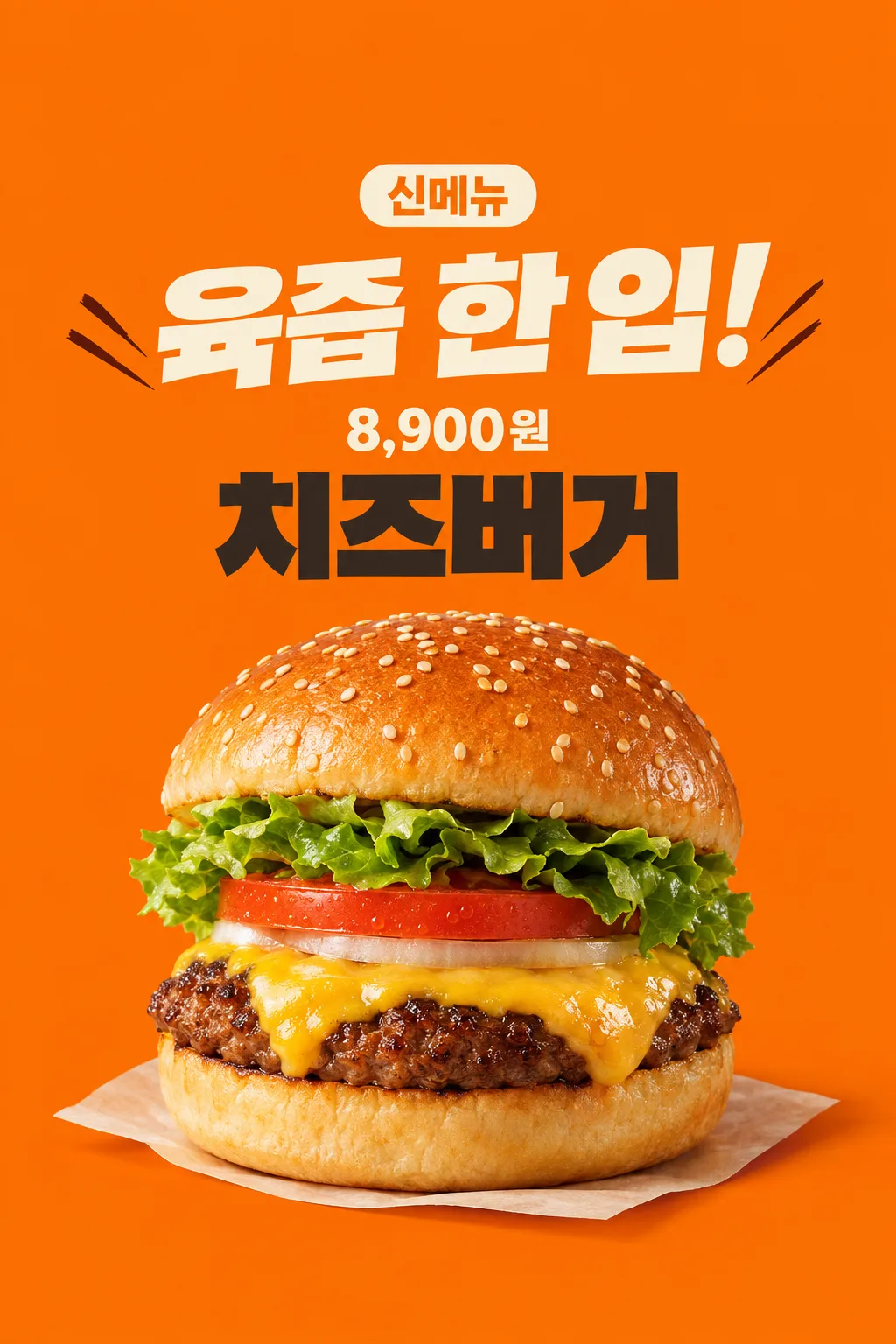
Create one finished appetizing new-burger poster for a burger shop's entrance and social account. Use the actual attached food photograph and the shop's supplied menu name and final selling price. One industry, one hero burger, one fixed energetic orange poster. The image must make the real food look inviting before adding information. It is not a discount offer, a menu grid or a launch-date teaser.

[Scene]
The menu name is "【メニュー名】". The exact selling-price string is "【販売価格】". The short headline is "【大きな一言】". If the headline is "おまかせで選んで", choose one original short food-sensation phrase of at most ten Korean/Japanese characters or four English words, based only on visible food features. Do not print the automatic control. Do not invent an ingredient, discount, free side, portion, delivery method, available date, limited quantity, bestseller rank, origin, nutritional advantage or cooking claim. The fact that this is a new-menu announcement is the card's fixed purpose; do not infer any extra launch condition.

[Attached photo]
The single actual burger photograph is REQUIRED. Preserve the visible burger's ingredient count, bun form, patty texture, cheese and vegetable layers. Do not replace the user's burger with a generic taller product, multiply patties or add bacon that is absent. Recompose the same burger as one appetizing hero in the poster, while excluding branded wrapping, logos and other dishes. Preserve the rounded puffy top bun and thick soft bottom bun when present; bread must not become a flat biscuit. Sesame seeds vary naturally in position and size rather than repeating in a geometric pattern. The seared patty edge has irregular browned bits, and melted cheese follows the uneven food surface. Tomato and lettuce remain plausible continuous pieces, not floating identical sheets. Keep the actual ingredient order in the photo.

[Text layout]
All visible copy is in Japanese, except a supplied currency or name which keeps its exact spelling. The orange ground fills the canvas. At13-17% print the small clear fixed label "新メニュー". At18-29% print the supplied or newly chosen sensation headline in very large cream lettering over at most two lines. At45-89%, show one close three-quarter burger hero, with its base resting on a subtle cream paper surface and a real contact shadow. Do not add a drink, fries, second burger or exploded ingredients. At35-44% set "【メニュー名】" in large charcoal block lettering. At30-34% set "【販売価格】" directly on the orange ground, with no price rectangle behind it; keep the supplied currency and all digits. The price is smaller than the headline but clear in a thumbnail. Leave the upper12% and lower15% free of important text.
If supplied, put "【店名】" once as a modest shop signature beside the menu name above the food, inside the central text-safe region. If this instruction is removed, do not invent a shop or draw a blank label.

[Style]
One energetic Korean burger-shop poster: flat warm orange, bold cream typography, dark menu name and one realistic food photograph. Restrained diagonal ink strokes beside the headline add momentum without glowing or covering letters. The photographed food remains realistic, not illustrated or made of plastic. Avoid decorative awards, glossy3D letters, thick gold outlines, flames, exploding sauce, photorealistic sparks and neon. Use the whole image as finished flat art; no restaurant wall or phone mockup surrounds it.

[Visual hierarchy]
Food appetizingness and the big headline lead, followed by the price and menu name above the food. Keep clean readable hierarchy and at least7% side margins. Never hide a digit in cheese, sesame, decorative strokes or shadow. The menu and price stay above the food. Reduce the hero's height before sacrificing the text-safe region. Long menu names can break into two readable lines while the price remains one intact string. Do not repeat 'new' in the headline when the fixed new-menu label already says it.

[Lighting and texture]
Warm close studio light reveals moist seared meat, soft bun volume, naturally draped melted cheese and crisp visible leaves. Highlights are small and uneven, not a mirror-like greasy coating. A subtle warm contact shadow anchors one complete burger; no extreme steam cloud hides the food. Background orange contrasts with darker meat and pale bread. Food geometry and actual contents take priority over dramatic effects. Finish one image usable as supplied without cropping or compositing.


[Binding safe composition]
Arrange ALL text in the upper half of the finished poster. On1024x1536: y0-185 is empty orange; new-menu label y190-260; big sensation headline y275-460; intact price string y465-525; menu name y535-670; one complete puffy burger and contact paper x145-885,y690-1385. From y1300 down there is only orange, no text. Never put the price or menu name beneath the food. Place price directly on orange, no price plate. Preserve bun volume and realistic food proportions by uniformly scaling the whole burger. These ranges are binding and adapt proportionally.

[Text rules]
All quoted visible copy belongs to the artwork, while input labels and instruction headings do not. Resolve any automatic wording control into a short original sentence before drawing; never print that control literally. Preserve provided spelling and numbers, and use the target language consistently. Keep readable letters separate from highlights, folds, shadows and decorative marks. Do not invent a price, discount, date, availability, award, endorsement, biography or purchasing condition. The fixed composition and medium stay the same for every user; personal inputs change its content only.

[Avoid and final delivery]
Deliver exactly ONE finished raster image in this response. Draw it directly with image generation. Do not execute code, give drawing instructions instead of an image, offer multiple versions, create separate pages, ask for a next message, or require cropping and assembly. No phone mockup, browser frame, watermark, publisher logo, branded packaging, existing character or celebrity likeness. Finish all artwork within the selected aspect ratio, preserving the composition and large readable lettering. Leave the upper 12% and lower 15% free of essential lettering and maintain generous side margins.
こちらのカードも人気です
使い方・よくある質問
こんなときに使えます
ハンバーガー店で、新しい一品を店頭やSNSに紹介するポスターです。オレンジ色の背景、大きな食感の一言、実際のバーガー一個の写真、メニュー名と価格で構成します。ピザやチキンも一緒に扱う共通テンプレートではなく、バーガー店用の一枚です。割引率や発売日を勝手につけず、商品がどんな姿かを先に伝えます。メニュー全体ではなく、今回紹介する一品を目立たせたいときに向いています。
入力欄の使い方
メニュー名は実際の表示どおりに入れます。販売価格には、お客様が支払う金額と通貨を一緒に書いてください。見本の価格は入力例で、推奨価格ではありません。店名は任意なので、必要なければ空欄にできます。大きな一言は自分で書くか「おまかせで選んで」を選びます。自動の言葉は写真に見える食感だけから考えます。未確認の産地、製法、ランキング、健康効果は追加しません。割引や無料サービス、数量条件も勝手に作りません。
実際の料理写真が必要です
販売するバーガーの写真を一枚用意してください。パンの形、パティ、チーズ、野菜の層が見える斜めの角度がおすすめです。飲み物や包装ロゴが主役になる写真より、商品そのものがはっきり見える写真を選びます。GPTへ写真を添付してまだ送らず、同じメッセージにプロンプトを貼り付けます。写真と文章の両方を確認して一度送信してください。先に写真を送った場合は「上の写真を使って描いて」と最後に添えられます。コードや複数ページ、切り抜き作業は不要です。
見本の料理の確認方法
韓国の実店舗で撮影されたチーズバーガーの写真を開き、ふくらんだ上のパン、厚みのある下のパン、不規則な焼き目、自然に垂れるチーズと野菜を確認しました。参考写真のブランド、価格、包装やキャンペーンは取り入れていません。見本は入力例を示す架空のバーガーです。お客様に公開する画像は、ご自身が添付した料理を保つ指示になっています。
完成後に確認すること
実際のバーガーと並べて、パンが平たくなっていないか、パティが増えていないか、ないベーコンや付け合わせが足されていないか見てください。ごまが格子状に繰り返されたり、野菜が空中に浮いていたら不自然です。料理が食べたくなる見た目であることに加え、メニューの文字と価格の数字も正確でなくてはいけません。価格の後ろには黒い長方形を置かず、背景に直接表示します。上下の安全な余白へ重要な文字を入れないようにします。
投稿や印刷の前に
実際のメニュー名と支払額を再確認してください。割引、無料提供、期間などが必要なら、確認済み条件に対応する別のカードが適しています。印刷する場合は希望する紙の寸法と画像の解像度を印刷店に伝えます。生成画像がどの大きさでも鮮明になるとは限りません。SNSには完成した一枚をそのまま投稿できます。
よくある質問
- 写真なしでも使えますか? このカードは実際の料理写真が必須です。名前だけでは販売品と違う姿になることがあります。
- 価格を自動で決めますか? いいえ。お店が入力した価格だけを使い、割引や特典はつけません。
- 無料GPTで試しましたか? 見本は画像APIで生成し、料理と文字を確認しました。無料GPTの画面で直接生成する試験は行っていません。画像機能と残りの利用枠によって使えるかは異なります。
価格とメニュー名はバーガーの上にまとめ、下側には料理だけを残します。重要な文字が一覧の下の表示に隠れにくい配置です。