
All · Ads & posters · New products · Restaurants
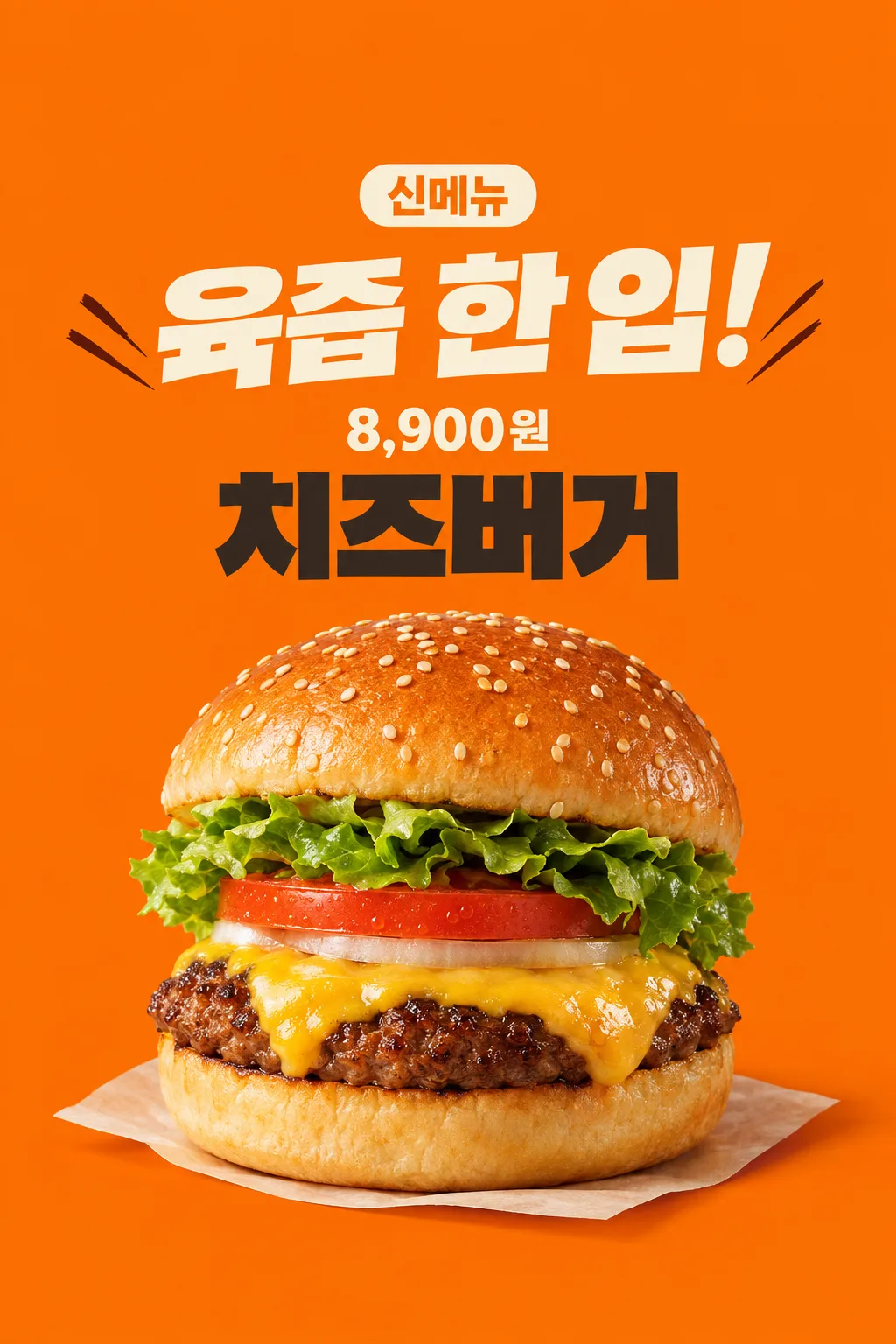
175New Burger Poster
Use your real burger photograph and selling price for a shop entrance or social announcement.
Fill in the fields
- 1Fill in the fields
- 2Copy the prompt
- 3Upload One actual burger photograph and paste the prompt into your GPT chat
- 4Check that both the photo and prompt are attached, then send
Full prompt 6,465 characters
Generate this image now. Draw it directly - do not describe it, explain it, or ask questions.
Output one landscape A3 poster, 420 x 297 mm, aspect ratio 1.414:1. Use the largest supported resolution. Final print target: 4961x3508 pixels at 300dpi. Keep all text at least 10 mm inside the edges.

[Purpose]
Create one finished appetizing new-burger poster for a burger shop's entrance and social account. Use the actual attached food photograph and the shop's supplied menu name and final selling price. One industry, one hero burger, one fixed energetic orange poster. The image must make the real food look inviting before adding information. It is not a discount offer, a menu grid or a launch-date teaser.

[Scene]
The menu name is "【Menu name】". The exact selling-price string is "【Selling price】". The short headline is "【Big headline】". If the headline is "Choose for me", choose one original short food-sensation phrase of at most ten Korean/Japanese characters or four English words, based only on visible food features. Do not print the automatic control. Do not invent an ingredient, discount, free side, portion, delivery method, available date, limited quantity, bestseller rank, origin, nutritional advantage or cooking claim. The fact that this is a new-menu announcement is the card's fixed purpose; do not infer any extra launch condition.

[Attached photo]
The single actual burger photograph is REQUIRED. Preserve the visible burger's ingredient count, bun form, patty texture, cheese and vegetable layers. Do not replace the user's burger with a generic taller product, multiply patties or add bacon that is absent. Recompose the same burger as one appetizing hero in the poster, while excluding branded wrapping, logos and other dishes. Preserve the rounded puffy top bun and thick soft bottom bun when present; bread must not become a flat biscuit. Sesame seeds vary naturally in position and size rather than repeating in a geometric pattern. The seared patty edge has irregular browned bits, and melted cheese follows the uneven food surface. Tomato and lettuce remain plausible continuous pieces, not floating identical sheets. Keep the actual ingredient order in the photo.

[Text layout]
All visible copy is in English, except a supplied currency or name which keeps its exact spelling. The orange ground fills the canvas. At13-17% print the small clear fixed label "New burger". At18-29% print the supplied or newly chosen sensation headline in very large cream lettering over at most two lines. At45-89%, show one close three-quarter burger hero, with its base resting on a subtle cream paper surface and a real contact shadow. Do not add a drink, fries, second burger or exploded ingredients. At35-44% set "【Menu name】" in large charcoal block lettering. At30-34% set "【Selling price】" directly on the orange ground, with no price rectangle behind it; keep the supplied currency and all digits. The price is smaller than the headline but clear in a thumbnail. Leave the upper12% and lower15% free of important text.
If supplied, put "【Shop name】" once as a modest shop signature beside the menu name above the food, inside the central text-safe region. If this instruction is removed, do not invent a shop or draw a blank label.

[Style]
One energetic Korean burger-shop poster: flat warm orange, bold cream typography, dark menu name and one realistic food photograph. Restrained diagonal ink strokes beside the headline add momentum without glowing or covering letters. The photographed food remains realistic, not illustrated or made of plastic. Avoid decorative awards, glossy3D letters, thick gold outlines, flames, exploding sauce, photorealistic sparks and neon. Use the whole image as finished flat art; no restaurant wall or phone mockup surrounds it.

[Visual hierarchy]
Food appetizingness and the big headline lead, followed by the price and menu name above the food. Keep clean readable hierarchy and at least7% side margins. Never hide a digit in cheese, sesame, decorative strokes or shadow. The menu and price stay above the food. Reduce the hero's height before sacrificing the text-safe region. Long menu names can break into two readable lines while the price remains one intact string. Do not repeat 'new' in the headline when the fixed new-menu label already says it.

[Lighting and texture]
Warm close studio light reveals moist seared meat, soft bun volume, naturally draped melted cheese and crisp visible leaves. Highlights are small and uneven, not a mirror-like greasy coating. A subtle warm contact shadow anchors one complete burger; no extreme steam cloud hides the food. Background orange contrasts with darker meat and pale bread. Food geometry and actual contents take priority over dramatic effects. Finish one image usable as supplied without cropping or compositing.


[Binding safe composition]
Arrange ALL text in the upper half of the finished poster. On1024x1536: y0-185 is empty orange; new-menu label y190-260; big sensation headline y275-460; intact price string y465-525; menu name y535-670; one complete puffy burger and contact paper x145-885,y690-1385. From y1300 down there is only orange, no text. Never put the price or menu name beneath the food. Place price directly on orange, no price plate. Preserve bun volume and realistic food proportions by uniformly scaling the whole burger. These ranges are binding and adapt proportionally.

[Text rules]
All quoted visible copy belongs to the artwork, while input labels and instruction headings do not. Resolve any automatic wording control into a short original sentence before drawing; never print that control literally. Preserve provided spelling and numbers, and use the target language consistently. Keep readable letters separate from highlights, folds, shadows and decorative marks. Do not invent a price, discount, date, availability, award, endorsement, biography or purchasing condition. The fixed composition and medium stay the same for every user; personal inputs change its content only.

[Avoid and final delivery]
Deliver exactly ONE finished raster image in this response. Draw it directly with image generation. Do not execute code, give drawing instructions instead of an image, offer multiple versions, create separate pages, ask for a next message, or require cropping and assembly. No phone mockup, browser frame, watermark, publisher logo, branded packaging, existing character or celebrity likeness. Finish all artwork within the selected aspect ratio, preserving the composition and large readable lettering. Leave the upper 12% and lower 15% free of essential lettering and maintain generous side margins.
You may also like
How to use it · FAQ
When to use it
Introduce one new burger on your shop entrance or social account. The fixed orange poster combines a bold sensory headline, one close photograph of your actual food, its menu name and selling price. It is a burger-shop image rather than a multi-industry food template. It does not add a discount or a launch date, and it does not redesign your entire menu.
Fill in the fields
Copy the exact name from your menu. Enter the actual final selling price with its currency; the preview's price is a demonstration, not pricing advice. Your shop name is optional. Write a short headline or select “Choose for me.” Automatic wording uses only visible food qualities and does not invent origin, preparation methods, awards, nutritional benefits or rankings. Discounts, gifts, delivery terms and limited quantities are excluded.
A real food photograph is required
Use one photograph of the burger you actually sell, with the bun and ingredient layers visible from a slight angle. Prefer a clear product view over a scene dominated by drinks or packaging logos. Attach the photo to GPT without sending yet, paste the copied prompt into the same message, check both items, and send once. If the photo was sent earlier, add “Use the photo above.” No code, multiple output pages or cutting and assembly are needed.
How the food reference was checked
Real photographs from a Korean burger shop were opened to inspect a rounded upper bun, a substantial lower bun, uneven browned patty edges and naturally draped cheese and vegetables. Their branding, packaging, price and promotions are not copied into this card. The thumbnail is a fictional input demonstration; your customer-facing result should preserve your own attached food.
Inspect the result
Compare it with your actual burger. The bun must not flatten, patty count must not increase, and absent bacon or sides must not appear. Sesame should not form a cloned grid, and vegetables should not float in identical sheets. The food should look appealing while every menu letter and price digit remains clear. The price sits directly on orange, without a black panel. Important copy must stay away from the top and bottom overlay areas.
Post or print it
Recheck the real menu name and payable price. A different promotion card is more suitable when you need verified discounts or other conditions. For printing, give the shop your requested paper dimensions and the actual image resolution; a generated image does not guarantee sharpness at every print size. You can post the complete image directly to social media.
Questions
- Can I omit the photo? This format requires a real food photograph. A menu name alone may produce a different product.
- Does GPT set my price? No. Only your supplied price is used, and no gift or discount is added.
- Was free GPT tested? The preview was generated through the image API and inspected for text and food structure. A direct free-GPT interface test was not performed; availability depends on the image feature and remaining allowance.
The price and menu name sit above the burger, leaving the lower area for food rather than important copy.