
すべて · 広告・ポスター · 新商品
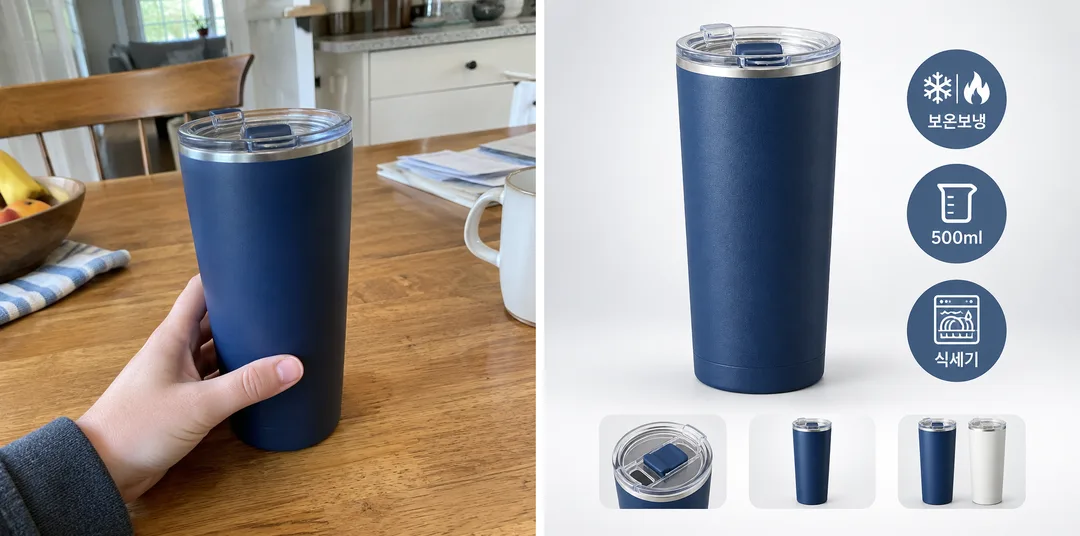
339ネットショップのメイン画像 — 白背景の商品・特徴バッジ3つ・選択肢のプレビュー
商品写真一枚と特徴を三つ入力すると、商品を大きく見せ、横に特徴バッジ3つ、下に色や付属品のプレビューを並べたメイン画像ができます。
受け取れるもの
- 正方形の商品メイン画像一枚
- 特徴バッジ3つ(アイコンと短い文字)
- 下部に色や付属品のプレビュー
ChatGPT 無料 OK
項目を入力
- 1項目を入力します
- 2コピーを押します
- 3GPTのチャットに貼り付けます
- 4そのまま送ると、サムネイルの例のような画像になります
- 5カードに合う実際の写真を一緒に入れると反映されます。背景カードなら背景の写真、人物・料理カードならその写真 任意
プロンプト全文を見る 3,121文字
Generate this image now. Draw it directly - do not describe it, explain it, or ask questions.
出力サイズは1080×1080ピクセル、1:1の正方形にしてください。文字を読みやすく配置してください。
The intended card format is 1:1; use the requested canvas size.

Create one polished online store main image with realistic studio product photography and compact ecommerce graphics. The hero product visibly fills roughly 60 percent of the canvas, with a large crisp silhouette. Use a bright light-gray gradient background and floor with a soft grounded contact shadow. Place exactly three round feature badges beside the product, each containing one simple icon and one short Japanese label of 2–4 characters. Along the bottom, add 2–3 small unlabeled previews of included components and/or color options. These are supporting elements within one listing image; the hero stays dominant. Make the full composition balanced and readable at thumbnail size.

SELECTION selected: "【配置】"
Interpret only the selected choice:
- 商品を左に: Hero product at left; three round badges in a vertical column at right; previews along the bottom.
- 商品を中央に: Hero centered slightly left of canvas center, leaving room for three round badges beside it; previews along the bottom.
- 商品を右に: Hero product at right; three round badges in a vertical column at left; previews along the bottom.
If missing or empty, use 商品を左に only.

FEATURES written by the seller: "【特徴】"
Split this line at · or , into exactly three short labels and print each label exactly as written, once, under a simple matching icon inside its round badge (e.g. 保温保冷 → snowflake and flame, 500ml → measuring cup, 食洗機対応 → dishwasher). If the line is empty, use three unlabeled icon badges that match the product. No prices, ratings, sale stickers or certification marks. The three badge labels are the only visible words; no preview captions or product lettering.

[Attached photo]
Preserve the attached product geometry, color, texture, components and quantity. Preview only components and color options supported by the supplied photos. If no options or separate parts are supported, use 2–3 unlabeled detail previews of the same item instead. Never imply invented accessories or variants are included or available. Remove source lettering and logos. Without a photo, never ask or stop: use a generic unbranded tumbler, a common retail product. Show its fitted lid and two small fictional color-option previews of the same design as illustration examples.

Produce exactly one finished image. All artwork is original and unbranded. No company references, logos, recognizable commercial designs, existing fictional characters, watermarks or interface elements. Selection labels are instructions only. Render only the visible text explicitly authorized above. Keep hands, posture and animal anatomy natural.

[Final output format]
出力サイズは1080×1080ピクセル、1:1の正方形にしてください。文字を読みやすく配置してください。
This selected output format takes priority over any fixed canvas size or aspect ratio elsewhere in this template. Adapt the composition, text zones and margins to the selected canvas without stretching or cropping essential content. Device safe areas apply only when a device is selected. Never print these format instructions on the image.
結果はどうでしたか?
こちらのカードも人気です
使い方・よくある質問
こんなときに
Smart StoreやCoupang用の商品メイン画像を手早く作りたいお店の方に。海外のプロンプト販売サイトで見かけるネットショップの商品画像の形式です。
欄の埋め方
自分の商品の事実だけを短く三つ、「·」で区切って入力します(例:保温保冷 · 500ml · 食洗機対応)。事実と違う特徴は虚偽表示になるおそれがあります。2〜5文字ほどだと、文字がきれいに出やすくなります。
写真を入れるとき
① 商品写真一枚をアップロード — まだ送らない ② 同じ入力欄にコピーしたプロンプトを貼る ③ 両方入ったのを確認して送る。
仕上がりの確認
- 商品の形・色・付属品が実物と同じか必ず確認してください。存在しない色や付属品が出てきたら「写真にあるものだけにして」と伝えましょう。
作例について
一覧のカバー画像は、写真を使わずにプロンプトだけで生成した作例です。写真なしでも、自分の写真を使っても利用できます。