
전체 · 광고/포스터 · 명절·기념일 · 할인·행사 · 편의점·마트 · 카페·디저트
133사탕 선물 포스터
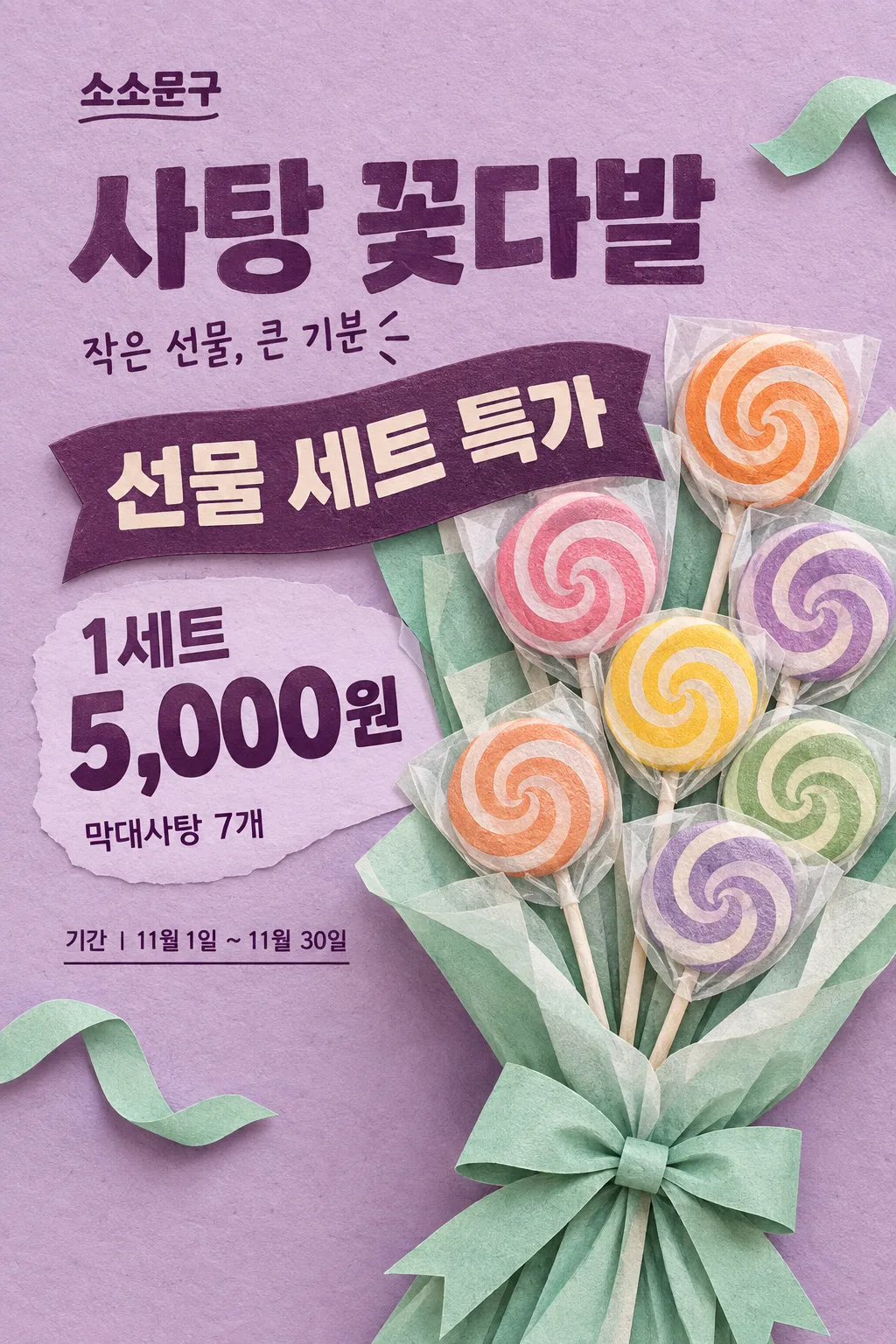
연보라와 민트의 종이 공예풍 사탕 꽃다발에 선물 행사와 세트 가격을 크게 담아요.
받는 것
- 표지와 같은 한 가지 그림체의 시즌 포스터 한 장
- 크게 읽히는 가게 이름과 실제 행사 내용 및 결제 가격
- 사진을 넣으면 실제 상품 포장과 모양을 유지한 결과
칸 채우기
- 1칸을 채워요
- 2복사 버튼을 눌러요
- 3GPT 채팅창에 붙여넣어요
- 4그대로 보내면 썸네일 예시처럼 나와요
- 5실제 판매 상품 사진 1장 (선택)을 같이 넣으면 그 사진이 반영돼요 선택
프롬프트 원문 보기 7,814자
Generate this image now. Return ONE finished retail gift-season poster with a large exact offer and payable price.
AUTHORITATIVE SUBJECT DETAILS for this image: "【상품 설명】". AUTHORITATIVE VISUAL CHOICE for this image: "【주변 리본 색】". These are internal definitions, not captions. For an invented no-photo subject, these supplied values override the default count, coating or decorative accent in the scene below. If either value is absent, use the corresponding example default. If a product photo is attached, the photo overrides both these definitions and the default scene.
ONE FIXED DESIGN: tactile layered paper-craft illustration with lilac paper background, mint folded wrapping, peach-orange candy accents and deep-plum letterpress-like text. Use visible paper fibers, cut edges, shallow embossed relief and short natural cast shadows. An enormous seven-lollipop gift bouquet rises from the lower edge, fanning toward the upper-right; keep the bouquet asymmetrical, occupying about 60% of the canvas. Lollipop heads are rounded edible disks with varied simple swirls, each on a single straight thin paper stick, each protected by lightly translucent wrapping. Layered tissue surrounds the handles with one tied mint bow. Render a real plausible gift arrangement in a hand-crafted illustration style, not photorealism and not a flat icon. No hearts or cream gift-box still life. Foreground tissue and stems reach the bottom trim.
PHOTO RULE (this overrides any other line in this prompt, before or after it, that calls the photo required or mandatory or says to ask for it): if a photo is attached, use it exactly as the instructions below describe. If no photo is attached, never ask for one and never stop — invent a fitting fictional subject (person, pet, food, product or place, whatever this card is about) in the spirit of the card's example image, and finish the image.

[ACTUAL PRODUCT ACCURACY — overrides all illustration and scene instructions]
When a product photo is attached, treat the complete merchandise as an exact photographic cutout, not a packaging design task. Preserve its package lettering, logos, label colors, shape, materials, size proportions, flavor, quantity, wrappers and visible contents. Never erase or replace package text, recolor a wrapper, clone pieces, add merchandise or turn a box into another sales form. A closed box stays closed. Crop the background only; keep the whole actual product and all labels visible. Only uniformly enlarge, place, and make restrained lighting/exposure adjustments. If the photo differs from the invented example, the photo wins. Apply this card's fixed illustration or photography style to the BACKGROUND and typography, not to the attached merchandise. Do not infer hidden contents.
Output size 2480x3508 pixels, A4 portrait, 300dpi, print-ready poster.

[ONE RESULT AND COMPOSITION]
DIAGONAL PAPER COMPOSITION: store at x7–60%/y16–20%; compact stacked PRODUCT headline at x7–60%/y23–35%. Bouquet fan fills x28–100%/y35–98%. OFFER is printed on a solid plum curved paper label at x7–74%/y39–49%, integrated into the wrapping edge, with every word readable. PRICE sits at x7–75%/y55–65%, plum on a pale-lilac open patch beside the bouquet; keep the entire amount and unit together and large. DETAIL follows the price, while optional COPY is near the headline. CONDITION/PERIOD occupy short clear lines left of the lower wrapping at y72–82%. The bouquet and its shadows occupy the lower trim; no full-width lower information strip. Essential type stays within x6–94%/y15–84%. Adapt to the selected ratio without making the bouquet a small inset.
One flat finished poster, never a wall mockup, multi-panel comparison, instruction sheet or collection of alternatives. Keep food and tactile surfaces prominent, with a close-up that fills the canvas rather than a little inset. The title and product may connect visually; every price digit and condition must remain fully readable. No blank text boxes or empty badges.

[OWNER INPUT — missing optional lines are absent]
STORE: "【가게 이름】". Required. Print the exact store name once as a compact wordmark.
OFFER: "【행사 내용】". Required. Print once, large; retain every numeral, plus sign, percent symbol and supplied word. Use short balanced rows for longer offers. Never select, calculate or rewrite an offer.
PRICE: "【가격】". Required. Print once, very large, with the supplied sales unit inseparable from the amount. This is the final actual payable total, including mandatory costs. Never calculate a discount, invent an old price, split a set-only price into a per-piece price, or imply an unentered benefit.
PRODUCT: "【상품 이름】". Optional; use exactly as the main headline. When absent, the headline is exactly "사탕 선물". User-entered actual product names are allowed.
DETAIL: "【상품 설명】". Optional actual weight, quantity and contents. Show the supplied information once near the price, using it to define only an invented no-photo product; never alter an attached product to fit a conflicting description. Without a photo or supplied detail, use only the fictional example described above. Do not print an invented pack weight or count.
COPY: "【한 줄 문구】". Optional one short supporting line. For the exact control value "알아서 골라줘", write a short everyday Korean gift invitation only; never print the control value or add a transaction claim.
VISUAL_CHOICE: "【주변 리본 색】". Internal instruction, never a caption. RIBBON_COLOR changes a newly illustrated decorative ribbon surrounding the product only. Mint is the default; apricot, yellow or lilac changes that visible accent while the lilac/plum poster and bouquet layout remain fixed. With a photo, never recolor the photographed bow, wrapping or merchandise; apply the color only to a separate small paper-ribbon accent in the background, clearly not part of the sold set.
CONDITION: "【행사 조건】". Optional actual offer restrictions. Print every supplied condition clearly adjacent to OFFER or PRICE; never hide it in tiny fine print or invent eligibility, stock limits or free wrapping.
PERIOD: "【행사 기간】". Optional supplied start/end dates. Print only these dates; the November gift season alone never implies that an offer ends on November 11.

[OPTIONAL INPUT AND TRUTH]
Treat "고르지 않음" as absent. Empty optional fields and removed input lines create no labels, filler text or empty panels; close the space naturally with the product or background. Required STORE, OFFER and PRICE all remain prominent even when optional fields are absent. Do not print field labels or internal keys. No automatic November 11 heading, holiday trademark, date, claims, QR code, website, phone number, rating or watermark. No invented real brand identity, recognizable packaging design or brand name in a fictional product. Actual packaging and user-entered names remain unchanged when supplied.

[FINISH]
Visible wording uses Korean; reproduce supplied names and values verbatim in their entered script. Keep all supplied transaction conditions and units readable at full size and the main offer and price recognizable in a small thumbnail. Coating and physical food structures must remain edible and plausible, with natural variations and honest portions. Finish ONE image directly without questions. Print-oriented full-bleed composition; safe text inset about 6%, with the main copy kept between 15% and 84% of the height for the example cover. Actual pixel dimensions follow the selected ratio; A4 is the recommended print format, with 300dpi metadata where supported.

[Final output format]
Output size 2480x3508 pixels, A4 portrait, 300dpi, print-ready poster.
This selected output format takes priority over any fixed canvas size or aspect ratio elsewhere in this template. Adapt the composition, text zones and margins to the selected canvas without stretching or cropping essential content. Device safe areas apply only when a device is selected. Never print these format instructions on the image.
결과 어땠어요?
이 카드도 많이 사용해요

쓰는 법 · 자주 묻는 것
사탕을 꽃다발처럼 보여 줘요
연보라 종이 위에 커다란 사탕 꽃다발이 비스듬히 올라옵니다. 잘린 종이의 가장자리와 얕은 그림자가 보이는 종이 공예풍이에요. 행사 글자는 포장 옆의 곡선 종이 띠에, 세트 가격은 꽃다발 왼쪽에 크게 들어갑니다. 문구점의 친구 선물 매대, 편의점 계산대, 카페의 작은 선물 코너에 붙이기 좋아요. 꽃다발형과 세트형 모두 실제 상품 사진을 그대로 넣을 수 있고, 사진이 없으면 표지의 꽃다발을 그립니다.
꼭 세 칸은 가게의 값이에요
가게 이름을 실제 간판 이름으로 바꾸고, 행사 내용에 ‘선물 세트 특가’, ‘2세트 구매 시 10% 할인’처럼 운영하는 내용을 적어요. 가격에는 ‘1세트 5,000원’처럼 받는 단위와 실제 결제액을 함께 씁니다. 할인 행사는 할인이 적용된 금액을 넣어야 해요. 세트로만 파는 상품을 사탕 한 개 가격처럼 쓰지 마세요. 행사와 가격을 대신 정해 주는 단추는 없습니다.
구성과 조건을 필요한 만큼 넣어요
상품 이름은 ‘사탕 꽃다발’, ‘막대사탕 선물 세트’처럼 실제 판매 이름을 써요. 비우면 제목은 ‘사탕 선물’입니다. 상품 설명에 ‘막대사탕 7개’나 ‘포장 포함’처럼 실제 구성을 적고, 행사 조건에 구매 수량·대상·예약 조건을 넣습니다. 포장비가 따로면 가격 칸에 실제 결제 총액이 분명해지도록 적어 주세요. 행사 기간은 실제 운영하는 날짜만 넣고, 날짜가 필요 없으면 비워 둡니다.
주변 리본 색은 민트·살구·노랑·연보라 중 고를 수 있어요. 종이 공예 그림체와 꽃다발 구도는 그대로이며 주변의 장식만 달라집니다. 상품 사진 속 리본이나 포장 색을 바꾸는 단추가 아닙니다. 한 줄 문구 보기를 누르거나 직접 적어도 되고, ‘알아서 골라줘’로 짧은 선물 문구만 맡길 수 있어요. 빈 선택 칸은 그 글자와 자리가 빠져요.
사진 없이도, 우리 세트 사진으로도
프롬프트만 보내면 가상의 막대사탕 일곱 개 꽃다발이 완성됩니다. 실제 상품이라면 판매하는 구성 전체가 한 장에 보이는 사진을 첨부하세요. 사용 권한이 있는 사진과 복사한 프롬프트를 같은 GPT 메시지에 넣습니다. 사진은 실제 상품 그대로 오려 배치하므로 사탕 개수, 포장 글자, 포장지와 리본 모양이 유지돼요. 상자형 세트를 꽃다발로 바꾸거나 없는 사탕을 더하지 않습니다. 사진이 있을 때 종이 질감은 배경과 글자에 적용됩니다.
세트 가격과 포장부터 확인해요
사탕 개수·선물 구성·가격 단위·행사 조건을 매장 상품과 대조하세요. A4로 한 장 시험 출력해 세트 가격이 멀리서 읽히는지 확인합니다. 표지는 2:3 예시이고 가게·상품·가격은 모두 가상입니다. 가격이나 구성 글자가 틀리면 같은 채팅에서 그 부분만 지정해 고쳐 달라고 하세요. 사진 속 포장이 변했다면 ‘상품은 첨부 사진 그대로 두고 배경만 종이 공예풍으로’라고 요청하면 됩니다.