
전체 · 광고/포스터 · 신메뉴·신상품 · 음식점·식당
169피자 출시 예고
피자 가게 사장님이 실제 신메뉴 출시일을 출입문·매장 SNS에 알리는 사진 티저예요.
칸 채우기
- 1칸을 채워요
- 2복사 버튼을 눌러요
- 3GPT 채팅창에 음식 사진을 올리고, 프롬프트를 같이 붙여넣어요
- 4음식 사진과 프롬프트가 둘 다 들어간 걸 보고 보내요
프롬프트 원문 보기 6,007자
Generate this image now. Draw it directly - do not describe it, explain it, or ask questions.
Output one landscape A3 poster, 420 x 297 mm, aspect ratio 1.414:1. Use the largest supported image resolution. Final print target is 4961x3508 pixels at 300dpi; keep all lettering at least 10 mm inside every paper edge. Preserve the wide composition and print-safe margins.

[Purpose]
Make ONE finished pizza-shop launch teaser for a shop entrance or its social account. The result is a restrained dark photographic poster with only part of one real pizza revealed. It announces the supplied launch date and menu, not a discount, preorder, giveaway or currently available offer. Use one fixed charcoal-and-warm-amber photographic style. This is distinct from a full-pizza pickup price poster.

[Scene]
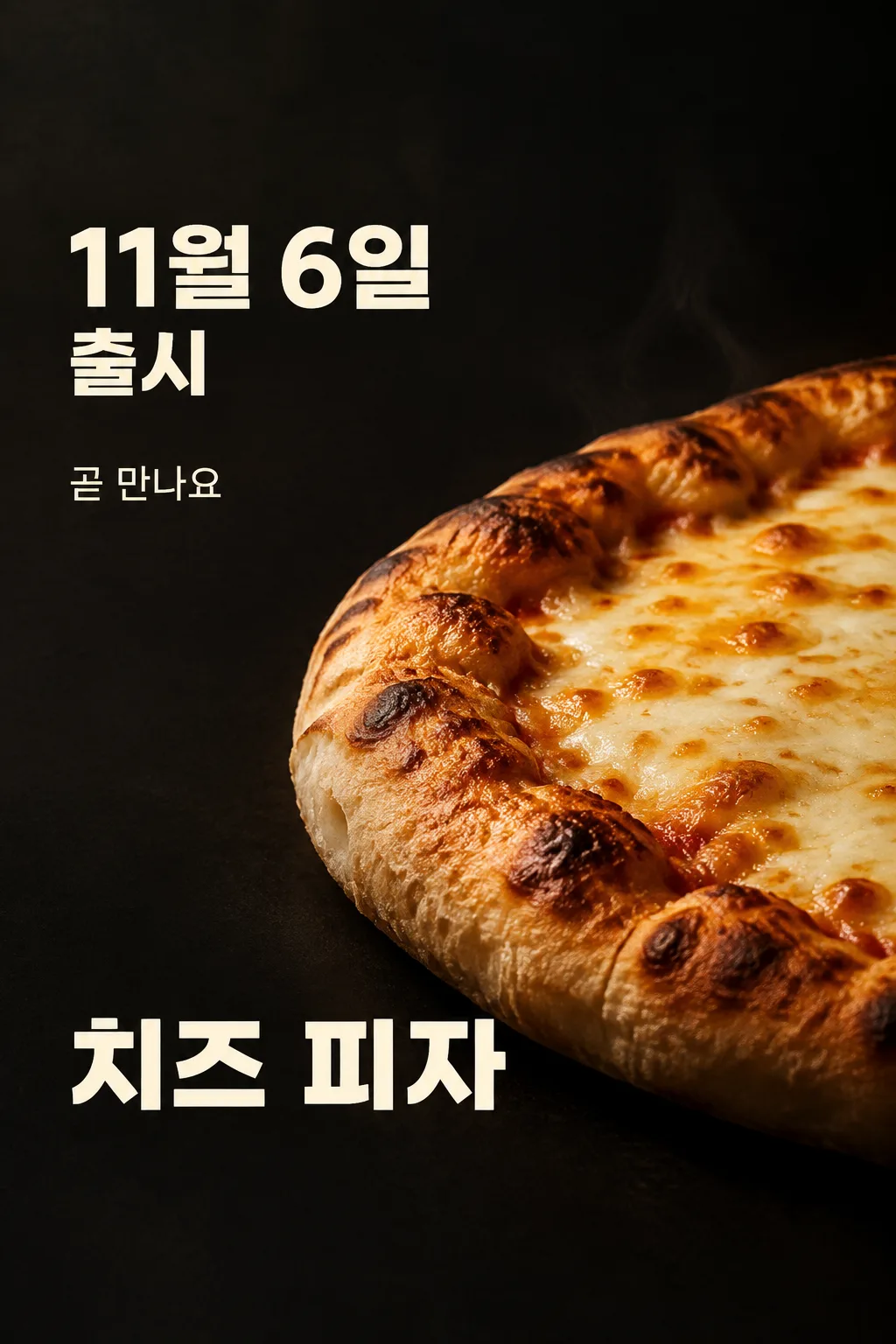
The menu being announced is "【메뉴 이름】". Use a very close, low three-quarter view of its actual pizza. Reveal a large curved section from the lower right, with the rest disappearing naturally into the image boundary and shadow. Show enough food to look immediately appetizing: a raised baked dough rim with irregular brown blisters, a real porous bread side, melted cheese in uneven creamy patches and natural toasted spots. Preserve only the toppings visible in the attached photograph. Never fill a cheese pizza with invented potatoes, bacon, mushrooms, herbs or garnish. The surface is a connected baked food structure, not a repeated tile pattern. The rim has volume and rounded curvature, never flat paper bread. One subtle wisp of fresh heat is enough; do not cover the food with artificial fog.

[Attached photo]
The user must attach a photograph of the actual menu together with this complete prompt in the same message. Preserve its crust type, relative thickness, toppings and serving shape. Relight the food without adding ingredients or changing what is being sold. Do not reproduce a logo, packaging, watermark or unrelated label from the reference. The photograph determines the food and the fields determine the wording. Do not substitute a random franchise product. A separately marked cover demonstration may use an original fictional pizza, but the customer-facing result uses the customer's actual photograph.

[Text layout]
Visible copy is Korean. Keep top0-12% and bottom85-100% clear of essential text. Leave the upper0-15% as empty dark background. In the upper-left at18-28%, print the date input "【출시일】" followed by "출시" ONCE in large warm ivory bold sans serif. Fit the entire date-and-launch block inside18-29% height, at least7% from either side. Scale it to fit this box instead of pushing it toward the top. The launch word may be smaller on the second line within the SAME box. The date is exactly supplied: do not invent a year, weekday, opening time or countdown. At32-36% place one smaller headline, resolved from the copy input "【기대 문구】". If that input is "알아서 골라줘", create one short Korean anticipation sentence without claims about ingredients, superiority, quantities or offers. Otherwise reproduce the supplied line. Never print the automatic-control phrase. At75-82% put the exact menu name once in large ivory lettering. A long name wraps naturally into at most two lines. The photographic pizza curve occupies x26-100%,y39-72%, where the brightest cheese area is separate from all letters. The dark left column remains clean.
If provided, print "【가게 이름】" once as a modest shop credit at83-84%. If this instruction is absent, leave that credit out without an empty label or placeholder.

[Style]
One cinematic food teaser, deep charcoal matte background, amber side light and ivory type. Layout stays fixed across customers. No collage, split comparison, comic, menu table, neon, glitter, lens flare, price badge or generic announcement frame. The headline is subordinate to the date and food. Treat the launch date as clear factual information in sans serif, not handwriting. The menu name identifies the product. Render only the supplied date, menu, one headline and optional shop name; no duplicate Coming Soon label.

[Lighting and texture]
Make the food look freshly baked and believable. Cheese melts onto the dough with varied small browned regions, the bread rim has soft volume and tiny irregular air pockets, and shadows follow one warm side light. Preserve the photographic distinction between cheese, crust and tomato sauce if present. Never make a shiny plastic crust or perfectly replicated toppings. The teaser's shadow hides part of the product without hiding every recognizable food detail. Keep all letters on clean dark background and use generous side margins.

[Factual discipline]
No price, discount, launch-year assumption, availability promise, origin, weight, serving size, delivery channel, reservation method, minimum spend, stock limit or award is supplied, so add none. Do not calculate or print a weekday. Do not say sold out, limited, free or today. This image can be posted as a complete teaser immediately after the owner verifies their actual date and photograph.

[Text rules]
All quoted visible copy belongs to the artwork, while input labels and instruction headings do not. Resolve any automatic wording control into a short original sentence before drawing; never print that control literally. Preserve provided spelling and numbers, and use the target language consistently. Keep readable letters separate from highlights, folds, shadows and decorative marks. Do not invent a price, discount, date, availability, award, endorsement, biography or purchasing condition. The fixed composition and medium stay the same for every user; personal inputs change its content only.

[Avoid and final delivery]
Deliver exactly ONE finished raster image in this response. Draw it directly with image generation. Do not execute code, give drawing instructions instead of an image, offer multiple versions, create separate pages, ask for a next message, or require cropping and assembly. No phone mockup, browser frame, watermark, publisher logo, branded packaging, existing character or celebrity likeness. Finish all artwork within the selected aspect ratio, preserving the composition and large readable lettering. Leave the upper 12% and lower 15% free of essential lettering and maintain generous side margins.
이 카드도 많이 사용해요
쓰는 법 · 자주 묻는 것
출시 전에 문과 피드에 붙이는 한 장
새 피자가 나오는 날을 먼저 알리고 싶은 피자 가게 사장님을 위한 예고 포스터입니다. 메뉴 전체와 가격을 한꺼번에 보여 주는 주문 포스터와 달리, 어두운 화면에서 피자의 둥근 테두리와 치즈 일부가 크게 보입니다. 손님은 날짜와 메뉴 이름을 먼저 읽고 가까운 음식 사진으로 기대하게 됩니다. 출입문, 계산대 옆, 매장 SNS에 완성된 한 장 그대로 쓰세요. 별도로 사진을 잘라 붙이는 편집 단계는 없습니다.
실제 피자 사진은 필수예요
판매할 신메뉴를 직접 찍은 사진을 준비해 주세요. 표면의 치즈, 도우 두께, 토핑이 보이는 사진이 좋습니다. 사진을 GPT 입력창에 올리되 아직 보내지 않고, 이 카드에서 복사한 전체 프롬프트를 같은 입력창에 붙입니다. 사진과 글이 모두 들어간 것을 확인한 뒤 한 번 보내세요. 사진만 먼저 보냈다면 프롬프트 끝에 “위 사진으로 그려줘”라고 덧붙일 수 있습니다. 표지는 구도를 보여 주는 가상 치즈 피자 시연이며 실제 판매 상품의 증명이 아닙니다.
날짜는 가게에서 확정한 값
출시일 칸에는 실제로 확정한 날짜를 적으세요. 예시인 11월 6일은 사용 방법을 보여 주는 값이며 그대로 판매 일정으로 쓰면 안 됩니다. 다른 해의 일정이라면 연도까지 직접 적을 수 있습니다. GPT는 쓰지 않은 연도, 요일, 영업 시작 시각을 추가하지 않도록 지시했습니다. 문구와 달리 날짜에는 알아서 골라줘가 없습니다. 사장님이 정해야 하는 사실이기 때문입니다.
메뉴 이름과 짧은 기대 문구
메뉴 이름에는 가게에서 실제로 쓰는 이름 하나를 넣으세요. “치즈 피자”처럼 짧은 이름은 사진 아래에 크게 읽힙니다. 기대 문구를 정하지 못했다면 맨 앞 보기인 알아서 골라줘를 누르면 됩니다. GPT가 가격이나 혜택을 만들지 않는 짧은 예고 문장을 씁니다. 직접 쓴 문구도 사용할 수 있지만 할인율, 무료 증정, 수량 한정처럼 확인되지 않은 조건은 덧붙이지 마세요. 가게 이름은 선택이며 비우면 그 작은 줄만 사라집니다.
이 포스터의 고정된 모양
위쪽 날짜, 그 아래 짧은 문구, 오른쪽에서 드러나는 피자 곡선, 아래 메뉴 이름으로 완성됩니다. 사진은 가까운 실사이고 글씨는 또렷한 고딕입니다. 검은 배경을 형광색으로 바꾸거나 가격표 형식을 고르는 칸은 없습니다. 사용자마다 실제 피자와 날짜는 달라지지만 출시 예고라는 결과와 구도는 유지됩니다. 가격까지 크게 보여 줄 필요가 있다면 그 목적에 맞는 별도 포스터가 적합합니다.
음식과 글자를 다시 확인해 주세요
완성되면 실제 사진과 나란히 보고 도우가 납작해지지 않았는지, 치즈가 플라스틱처럼 굳지 않았는지 살펴보세요. 사진에 없던 감자, 햄, 버섯이 생기거나 같은 조각이 반복되면 고쳐야 합니다. 날짜와 메뉴 이름을 한 글자씩 읽고, 위와 아래의 여백에 중요한 글자가 밀리지 않았는지도 확인하세요. 효과보다 음식이 맛있어 보이는 것이 먼저입니다. 가게 이름과 출시일이 정확한 후에 게시하세요.
고치고 다시 만들기
날짜가 틀렸다면 실제 값을 다시 입력하고, 음식이 달라졌다면 토핑과 도우가 선명한 사진으로 바꿉니다. 완성된 전체 프롬프트와 사진을 새 메시지로 함께 보내 한 장을 다시 받으세요. 여러 버전을 요청하거나 피자만 따로 만들어 자르는 과정은 없습니다. 실제 출시 후에는 예고물을 계속 붙여 두지 말고 현재 판매 정보를 알리는 자료로 바꾸는 것이 좋습니다.
자주 묻는 것
- 가격도 들어가나요? 이 카드는 출시일을 알리는 예고형이라 가격 칸이 없습니다.
- 토핑은 GPT가 정하나요? 아니요. 실제 판매할 메뉴 사진의 토핑을 따르도록 지시했습니다.
- 가게 이름을 꼭 넣어야 하나요? 선택입니다. 비우면 이름 줄만 빠집니다.
- 무료 GPT에서 직접 시험했나요? 제작 표지는 지정 이미지 API로 확인했습니다. 무료 GPT 화면의 직접 생성 시험은 하지 않았습니다.