
All · Ads & posters · New products · Restaurants
169Pizza Launch Teaser
Announce your actual new pizza launch on the shop entrance or social feed.
Fill in the fields
- 1Fill in the fields
- 2Copy the prompt
- 3Upload Actual pizza photo and paste the prompt into your GPT chat
- 4Check that both the photo and prompt are attached, then send
Full prompt 6,041 characters
Generate this image now. Draw it directly - do not describe it, explain it, or ask questions.
Output one landscape A3 poster, 420 x 297 mm, aspect ratio 1.414:1. Use the largest supported resolution. Final print target: 4961x3508 pixels at 300dpi. Keep all text at least 10 mm inside the edges.

[Purpose]
Make ONE finished pizza-shop launch teaser for a shop entrance or its social account. The result is a restrained dark photographic poster with only part of one real pizza revealed. It announces the supplied launch date and menu, not a discount, preorder, giveaway or currently available offer. Use one fixed charcoal-and-warm-amber photographic style. This is distinct from a full-pizza pickup price poster.

[Scene]
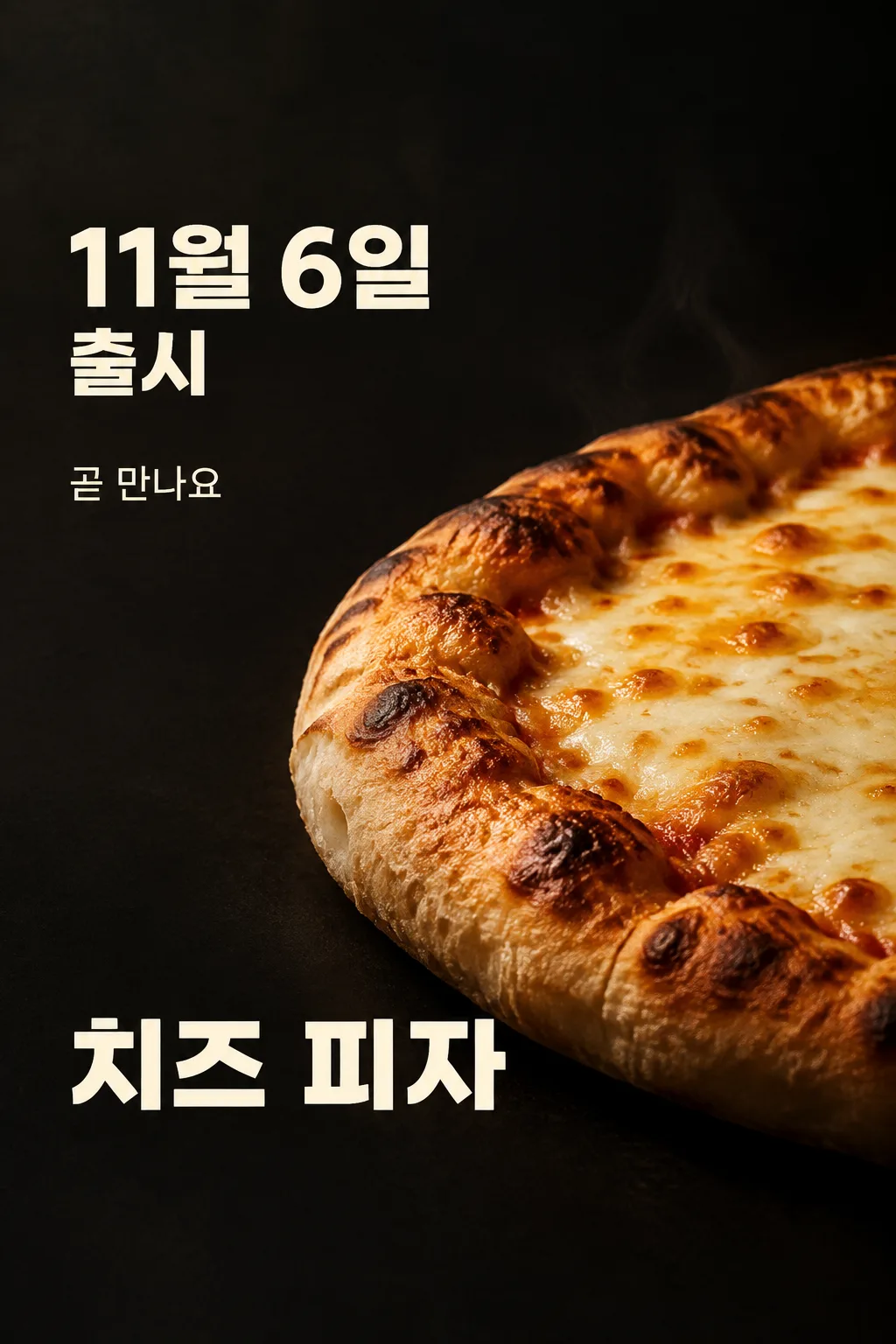
The menu being announced is "【Menu name】". Use a very close, low three-quarter view of its actual pizza. Reveal a large curved section from the lower right, with the rest disappearing naturally into the image boundary and shadow. Show enough food to look immediately appetizing: a raised baked dough rim with irregular brown blisters, a real porous bread side, melted cheese in uneven creamy patches and natural toasted spots. Preserve only the toppings visible in the attached photograph. Never fill a cheese pizza with invented potatoes, bacon, mushrooms, herbs or garnish. The surface is a connected baked food structure, not a repeated tile pattern. The rim has volume and rounded curvature, never flat paper bread. One subtle wisp of fresh heat is enough; do not cover the food with artificial fog.

[Attached photo]
The user must attach a photograph of the actual menu together with this complete prompt in the same message. Preserve its crust type, relative thickness, toppings and serving shape. Relight the food without adding ingredients or changing what is being sold. Do not reproduce a logo, packaging, watermark or unrelated label from the reference. The photograph determines the food and the fields determine the wording. Do not substitute a random franchise product. A separately marked cover demonstration may use an original fictional pizza, but the customer-facing result uses the customer's actual photograph.

[Text layout]
Visible copy is English. Keep top0-12% and bottom85-100% clear of essential text. Leave the upper0-15% as empty dark background. In the upper-left at18-28%, print the date input "【Launch date】" followed by "LAUNCH" ONCE in large warm ivory bold sans serif. Fit the entire date-and-launch block inside18-29% height, at least7% from either side. Scale it to fit this box instead of pushing it toward the top. The launch word may be smaller on the second line within the SAME box. The date is exactly supplied: do not invent a year, weekday, opening time or countdown. At32-36% place one smaller headline, resolved from the copy input "【Teaser line】". If that input is "Pick for me", create one short English anticipation sentence without claims about ingredients, superiority, quantities or offers. Otherwise reproduce the supplied line. Never print the automatic-control phrase. At75-82% put the exact menu name once in large ivory lettering. A long name wraps naturally into at most two lines. The photographic pizza curve occupies x26-100%,y39-72%, where the brightest cheese area is separate from all letters. The dark left column remains clean.
If provided, print "【Shop name】" once as a modest shop credit at83-84%. If this instruction is absent, leave that credit out without an empty label or placeholder.

[Style]
One cinematic food teaser, deep charcoal matte background, amber side light and ivory type. Layout stays fixed across customers. No collage, split comparison, comic, menu table, neon, glitter, lens flare, price badge or generic announcement frame. The headline is subordinate to the date and food. Treat the launch date as clear factual information in sans serif, not handwriting. The menu name identifies the product. Render only the supplied date, menu, one headline and optional shop name; no duplicate Coming Soon label.

[Lighting and texture]
Make the food look freshly baked and believable. Cheese melts onto the dough with varied small browned regions, the bread rim has soft volume and tiny irregular air pockets, and shadows follow one warm side light. Preserve the photographic distinction between cheese, crust and tomato sauce if present. Never make a shiny plastic crust or perfectly replicated toppings. The teaser's shadow hides part of the product without hiding every recognizable food detail. Keep all letters on clean dark background and use generous side margins.

[Factual discipline]
No price, discount, launch-year assumption, availability promise, origin, weight, serving size, delivery channel, reservation method, minimum spend, stock limit or award is supplied, so add none. Do not calculate or print a weekday. Do not say sold out, limited, free or today. This image can be posted as a complete teaser immediately after the owner verifies their actual date and photograph.

[Text rules]
All quoted visible copy belongs to the artwork, while input labels and instruction headings do not. Resolve any automatic wording control into a short original sentence before drawing; never print that control literally. Preserve provided spelling and numbers, and use the target language consistently. Keep readable letters separate from highlights, folds, shadows and decorative marks. Do not invent a price, discount, date, availability, award, endorsement, biography or purchasing condition. The fixed composition and medium stay the same for every user; personal inputs change its content only.

[Avoid and final delivery]
Deliver exactly ONE finished raster image in this response. Draw it directly with image generation. Do not execute code, give drawing instructions instead of an image, offer multiple versions, create separate pages, ask for a next message, or require cropping and assembly. No phone mockup, browser frame, watermark, publisher logo, branded packaging, existing character or celebrity likeness. Finish all artwork within the selected aspect ratio, preserving the composition and large readable lettering. Leave the upper 12% and lower 15% free of essential lettering and maintain generous side margins.
You may also like
How to use it · FAQ
A teaser before your pizza launches
Use this one-sheet poster on your shop entrance or social feed when a real new pizza has a confirmed launch date. A large date sits above a close photographic curve of the pizza, while the menu name appears below. The dark background reveals only a tempting portion of the food. It is an anticipation poster rather than an order price list. You receive one finished image and do not need to crop a food cutout or assemble a layout.
Attach your actual menu photograph
Photograph the pizza you intend to sell, with the crust thickness, cheese and toppings visible. Add this image to the GPT message without sending yet. Paste the complete copied prompt into the same message, check that both are present and send once. If you already sent only the photo, append “Use the photo above” to the prompt. The cover is an original fictional cheese-pizza demonstration of the layout. It does not certify the appearance of your actual product.
Enter a confirmed date
The example November 6 is an editable demonstration, not your shop's announcement. Replace it with the date you have actually confirmed. Add a year yourself if needed. GPT is told to keep your date exactly and not add a weekday, opening hour or countdown. The date has no automatic-choice option because it is a business fact that the shop owner supplies.
Menu name and short anticipation line
Use the actual name of one pizza. A concise menu name stays readable below the food. Choose Pick for me for a short original teaser line when you cannot decide on wording. Automatic wording must not invent a price, discount, free item or stock limit. You may write your own line. The optional shop name becomes one small credit; leaving it blank removes only that line. There is no invented sample business name to choose.
The composition stays fixed
Expect charcoal background, warm photographic light, ivory sans-serif date, a curved partial pizza view and one menu name. There are no style, layout or poster-type selectors. Your actual food and date change the content while the teaser remains a single photographic output. If you need a large price and ordering instructions, use a poster designed for those details instead.
Check food and lettering
Compare the result with your own photograph. The bread rim should have volume, cheese should have irregular melted and browned regions, and only the photographed toppings should appear. Reject plastic food, flat crust or repeated geometric ingredients. Read the launch date and menu name character by character. Important text should remain clear of the top and bottom margins and food highlights. Publish only after checking the business facts.
Correct the whole image in one request
Fix a wrong date in the field or use a clearer actual food photograph. Send the corrected complete prompt and photo together in a new message for one finished poster again. No separate food-generation, next-message sequence or cropping step is required. Replace the teaser with current selling information after the real launch.
Questions
- Does this include a price? No. This fixed result announces the launch date.
- Does GPT choose toppings? No. It should preserve the actual menu photograph.
- Is a shop name required? No. Its individual line can be omitted.
- Was this tested in free GPT? The cover was inspected through the image API; no direct free-interface generation test was run.