
All · Ads & posters · Restaurants
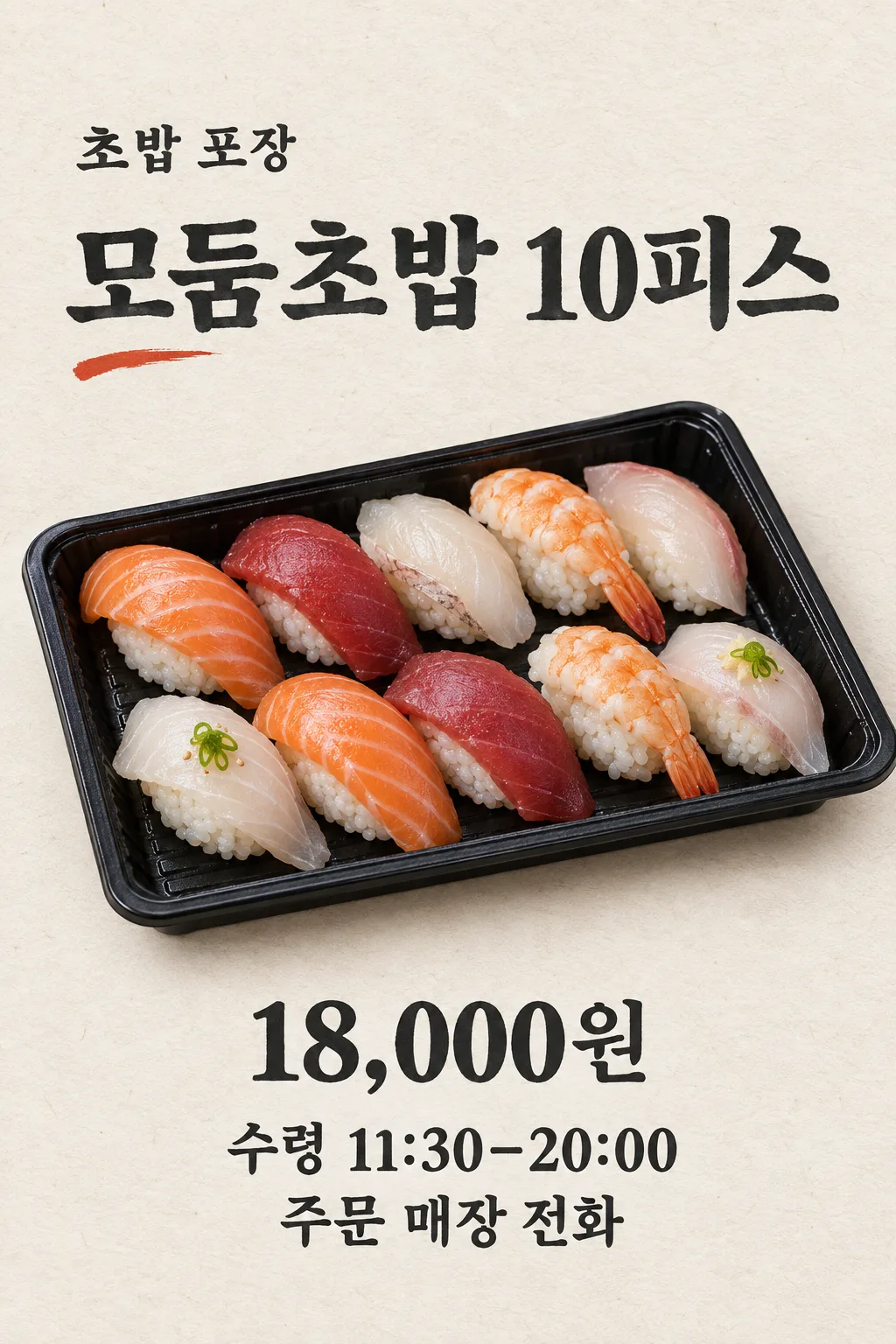
122Sushi Takeout Order Poster
Turn a real photo of your takeaway sushi set into one poster with its price, pickup time and order contact.
Fill in the fields
- 1Fill in the fields
- 2Copy the prompt
- 3Upload One photo of the sushi set you actually sell and paste the prompt into your GPT chat
- 4Check that both the photo and prompt are attached, then send
Full prompt 1,683 characters
Generate this image now. Draw it directly - do not describe it, explain it, or ask questions.
Output size 2480x3508 pixels, A4 portrait, 300dpi, print-ready poster.
Make exactly ONE completed vertical SUSHI TAKEOUT ORDER POSTER using ONE attached photo of the real sushi set this shop sells, attached in the SAME message. Without that photo, request it rather than inventing a commercial product. The photo controls piece count, kinds of seafood or egg, rice shape, garnishes and takeaway container. Each nigiri has a natural non-identical slice over a separate visible rice mound. Preserve genuine variation in thickness, marbling, shape and light. Never clone pieces, add fish not shown, make plastic rice, geometric fish slabs or a different set.

Use one fixed understated editorial design: bone-white washi-like paper, deep charcoal ink and one restrained vermilion brush accent. Leave top 12% and bottom 15% free of important text. At 15–21% print "【Shop name】" as a modest line. At 23–31% print the exact large "【Set name】". Across 32–67% place one strong three-quarter overhead photograph of the REAL takeaway sushi tray. Use soft daylight and a single natural shadow. At 69–83% print "【Actual selling price】" prominently, then separate lines "PICKUP  【Pickup hours】" and "ORDER  【Order contact】" in readable type. Preserve every digit and punctuation mark. If a piece count is in the set name, it must match the source photograph.

Do not invent a discount, free item, opening day, pickup deadline, delivery service, minimum order, allergy claim, freshness guarantee, phone digits, QR code, logo, branded bag, other dish or tiny terms. No mockup, menu of sets, variants, code, cropping or next step. Return one finished poster image only.
You may also like
How to use it · FAQ
Use it for
Print this poster near your sushi counter or post it to your shop's Instagram when you want customers to order a particular takeout set. The real food tray is the center of the page. Price, collection time and a working order contact appear together below it. The style is a light editorial page designed specifically around a takeaway sushi tray.
Fill and send
Use the name from your sign and the exact set name on your menu. If the name says ten pieces, make sure the photograph shows that set. Enter the price you actually charge, the time a customer can actually collect the order and a real phone number or ordering channel. Upload one current photograph of the food without sending it yet. Paste the filled prompt into that same GPT message and send the photo and text together once.
Check before posting
Compare piece count, fish types, rice, garnish and container with what you sell. Fish slices should vary naturally rather than look cloned. Check every price and contact digit and the pickup time against your current shop information. If any food or business fact is wrong, use a clearer current product photo and corrected fields to generate a new complete poster. Never post a version with an incorrect price or contact.