
All · Infographics & guides · Menus & pricing
246Three-Cut Photo Edited Menu
Aligning three photos with their corresponding menus and prices on the same line. This is a magazine-style menu that lets you read three menus of a brunch restaurant at a glance.
What you get
- Three-Cut Photo Edited Menu
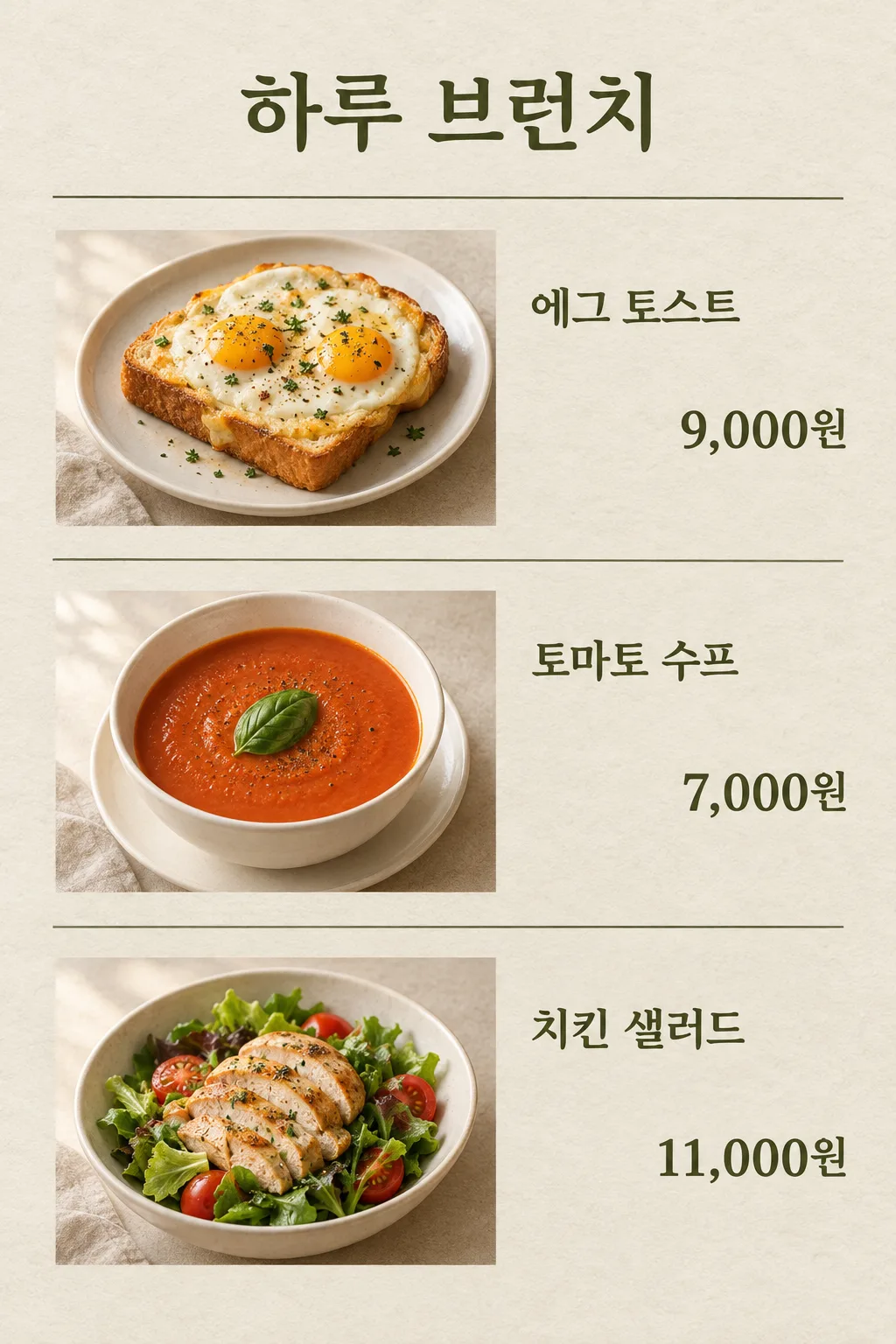
Fill in the fields
- 1Fill in the fields
- 2Copy the prompt
- 3Paste it into a GPT chat
- 4Send it as is and you get an image like the thumbnail example
- 5Attach a real photo that fits the card and it is used in the result: a background photo for background cards, a person or food photo for those cards Optional
Full prompt 4,940 characters
Generate this image now. Return exactly ONE complete image directly. Do not ask questions, browse for photos, return a plan or give a prompt instead of the image.
Print exactly this heading: "【Shop Name】".
Print exactly these top-row words: "【Menu 1】" and "【Price 1】".
Print exactly these middle-row words: "【Menu 2】" and "【Price 2】".
Print exactly these bottom-row words: "【Menu 3】" and "【Price 3】".
Those seven quoted values are the complete visible text. The photo composition sentences below are drawing directions only, never captions or subtitles. Each row has exactly TWO text groups, its menu name and its price, and no third line. Never print an English form key as the heading.

Output exactly one finished 2:3 portrait image, 1024x1536 pixels. Leave the top 12% and bottom 15% free of essential text.

[Input: values are the only facts and wording]
SHOP: "【Shop Name】"
MENU_1: "【Menu 1】"
PRICE_1: "【Price 1】"
MENU_2: "【Menu 2】"
PRICE_2: "【Price 2】"
MENU_3: "【Menu 3】"
PRICE_3: "【Price 3】"

[INTERNAL PHOTO AND COLOR DIRECTIONS — NEVER PRINT ANY OF THESE VALUES]
DETAIL_1: "【Menu 1 Photo Composition】"
DETAIL_2: "【Menu 2 Photo Composition】"
DETAIL_3: "【Menu 3 Photo Composition】"
TEXT_COLOR: "【Text Color】"
DISH_COLOR: "【Dish Color】"

[Fixed card design]
Create one finished small restaurant menu page with THREE photographs and EXACT corresponding names and prices, in a restrained editorial magazine design. Warm off-white subtly fibrous paper, TEXT_COLOR lettering, thin rules and matte food photography. SHOP is the only header, above three equal-height horizontal rows. Each row's left approximately 55% holds one real-looking complete food serving in DISH_COLOR ceramic. Its right area holds only that exact MENU_n and PRICE_n. Align all three prices to the same right edge, with strong simple uncovered digits.
Bind every pair before drawing: top row MENU_1, PRICE_1, DETAIL_1; middle row MENU_2, PRICE_2, DETAIL_2; bottom row MENU_3, PRICE_3, DETAIL_3. DETAIL_n affects only its own photo and is not printed. When absent use that menu's ordinary food composition; no bonus side meal. Keep consistent soft natural light from the left, scale and restrained tone across the three photos, with toasted edges, moist cut surfaces and uneven vegetables. The photos are intentional three row frames within one page, not a 3x3 grid or a collage of outputs.
SHOP plus the three exact MENU names and their three PRICE strings are the entire visible text. All spaces, digits, punctuation and currency units remain unchanged. Never swap or recompute prices, invent old prices, discount, menu descriptions, English subtitles, row numbers, origin, QR or logo. Give the three rows enough height for names and numbers to be legible; long names wrap naturally inside their own row, without crossing into another. Keep the lower row as finished and readable as the first. This is one flat finished menu, no paper mockup. Newly imagined food photos must not be labeled proof of real portion size.

[Button meanings, internal instructions only]
TEXT_COLOR: "Dark olive" means deep olive; "Dark navy" means deep navy; "Cocoa brown" means cocoa brown.
DISH_COLOR: "Warm white" means warm white; "Cream" means cream; "Pale gray" means pale gray.

[Missing inputs and finish]
An optional input line removed from this prompt is absent. Do not print its key, invent a substitute caption, ask for it or reserve an empty panel. Choose a fitting simple visual only where the fixed design explicitly permits an automatic default. Selected values alter content only; retain this card's single style and one composition. Every supplied visible string stays verbatim in its original script and currency, without translation. Ordinary automatic lettering, if explicitly allowed above, is English; internal English keys and button names are never captions.
Use the stated aspect ratio, adapting one coherent layout rather than stretching food or letters. Text-bearing posters keep important lettering within the central 16–83% of image height and 5–95% of width; extend food-related ornament, background, shadows or texture to the trim so these insets do not create empty bands. Keep all price digits and ingredient labels unobstructed. Text-free photographs fill the canvas naturally with their scene. No frame, phone, wall mockup, watermark or extra results.
No uploaded photo is needed: create a fictional food scene from these inputs. If a reference photo is attached, use it only for the stated food's visible shape and materials within this same drawing or photographic medium, without adding absent products or claiming exact portion preservation. Finish one image even when no photo is attached.

[Final output format]
Output exactly one finished 2:3 portrait image, 1024x1536 pixels. Leave the top 12% and bottom 15% free of essential text.
This selected output format takes priority over any fixed canvas size or aspect ratio elsewhere in this template. Adapt the composition, text zones and margins to the selected canvas without stretching or cropping essential content. Device safe areas apply only when a device is selected. Never print these format instructions on the image.
How did it turn out?
You may also like
How to use it · FAQ
Aligning Photos, Menus, and Prices on the Same Line
This is an edited menu format where photos of egg toast, tomato soup, and chicken salad are placed in three rows, with the menu name and price aligned to the right on the same line. The photo lighting and paper background are unified, making it look like a single page from a magazine for a small brunch restaurant. Rather than automatically expanding the entire menu, it organizes three items onto a single page.
Fill in the Shop Name and Three Pairs
After the shop name, write menu 1 and price 1, menu 2 and price 2, and menu 3 and price 3. "Egg toast / 9,000 won" is the first line, "Tomato soup / 7,000 won" is the middle, and "Chicken salad / 11,000 won" is the bottom. Use commas and units together for prices. If it is an overseas menu, write it in the actual currency, and do not perform currency or discount calculations in the image. Put in the actual amount paid by the customer as is.
Change the Photo's Internal Composition Separately
For the photo composition of menu 1, write only the food visible for that menu, such as "Two eggs on a slice of toast." Menus 2 and 3 also have their respective compositions and do not mix with others. Leaving the composition field blank determines a normal virtual food matching the menu name. Choose the text color from olive, navy, or cocoa, and the dish color from white, cream, or gray. There are no fields to select art styles or the number of rows, maintaining the three-row menu shape.
Match Photos and Prices from Top to Bottom
Paste the text-filled content into the image-generating GPT once to request a single completed menu. In the result, read the photos, names, and prices together by matching lines from the top. If 7,000 won has moved to the toast row, specifically correct it by saying, "Write 7,000 won right next to the tomato soup in the second row." Compare food amounts, egg counts, and prices with the actual menu before applying them in the store. If small text is blurry, shorten the menu names or choose a larger output size. This card is tailored to show food shapes together alongside text-only price lists.