
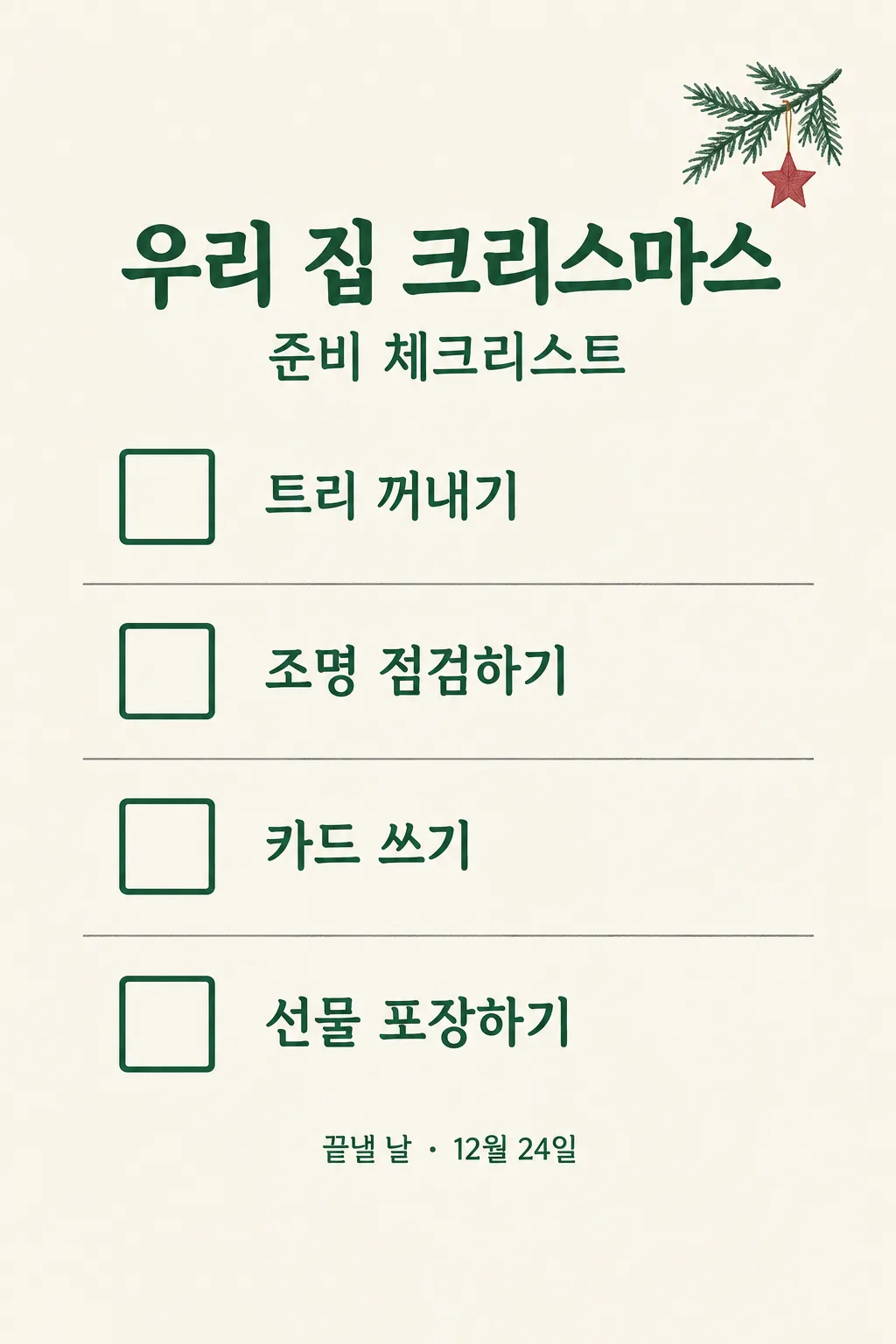
전체 · 인포그래픽/안내 · 순서·절차
077크리스마스 준비 체크리스트
가족·동거인이 준비할 일을 적어 한 장짜리 체크리스트를 냉장고에 붙이거나 단체 카톡방에 공유해요.
칸 채우기
- 1칸을 채워요
- 2복사 버튼을 눌러요
- 3GPT 채팅창에 붙여넣어요
- 4제품·인물 사진을 쓰려면 사진과 프롬프트를 둘 다 넣은 뒤에 보내요 선택
프롬프트 원문 보기 5,694자
Generate this image now. Draw it directly - do not describe it, explain it, or ask questions.
Output size 2480x3508 pixels, A4 portrait, 300dpi, print-ready poster.
Create exactly ONE complete 2:3 vertical Korean Christmas-preparation checklist image. This must be a final usable page that can be printed and marked with a pen or shared as one image in a family chat. Do not generate multiple slides, an empty template, code, a crop guide, a separate caption or a request for another turn.

[Purpose]
A household or friend group needs a practical shared list for its own Christmas preparation. The exact user-chosen list title is "【우리 준비표 이름】". The four real tasks they entered are "【준비할 일 1】", "【준비할 일 2】", "【준비할 일 3】", and "【준비할 일 4】". An optional user-supplied finish date appears on its own line below. The result is for a refrigerator door or a group KakaoTalk chat. It is not a store promotion, a Christmas event advertisement, a shopping list with fabricated prices, or a list of suggestions to consider. Respect the user's four tasks as the only tasks; their own wording is more useful than generic seasonal ideas.

[Scene]
Design a single crisp vertical paper checklist with four large rows. A compact, tasteful holiday illustration at the top or to one side can show an unbranded tree branch with a few hand-drawn ornaments and a soft paper star. Use the illustration only to identify the season, not as the main attraction. The checklist itself fills most of the page with generous white or cream space, a clear square checkbox at the beginning of each row, and the exact task text after it. All four boxes must be EMPTY so people can mark them after printing or annotate the saved image. Use four distinct rows with a simple vertical rhythm and mild alternating separators, not four cards arranged as a carousel or a crowded infographic of extra invented advice. If a task is long, wrap its own text within that row without moving the next task or shrinking to tiny lettering.

[Attached photo]
No photo is needed. If the user provides one, do not assume it is a product to advertise. At most draw one subtle motif from a photograph only if it clearly depicts the user's own decoration, while preserving the legibility and exact four tasks. The list must work fully from its text fields.

[Text layout]
Keep the top 12% and bottom 15% free of essential lettering for website overlay safety. In a quiet header around 14-24%, set "【우리 준비표 이름】" as a large readable Korean title, with a smaller subtitle "준비 체크리스트" only if it does not merely repeat words already in the supplied title. Four rows occupy about 29-76% of the page in the user's order. Each row has one empty square and exactly one task: "【준비할 일 1】", then "【준비할 일 2】", then "【준비할 일 3】", then "【준비할 일 4】". Optional finish-date line: "【끝낼 날짜】". If present, place it in a separate small but phone-readable line directly under the title or beneath the rows, with a neutral label "끝낼 날". If omitted, remove the entire line without inventing Christmas Eve, Christmas Day, a weekday or a deadline. Never add a fifth task, price, gift budget, quantity, location, RSVP, host, or event time not supplied. No "알아서 골라줘" is needed for task facts; the owner has to decide those.

[Style]
Choose a warm, useful seasonal design: cream paper, forest green text, muted cranberry for a few accents, and graphite rule lines. Restrained holiday illustration, generous checklist spacing, and clear Korean type should make the page pleasant enough to share but practical enough to mark. Avoid novelty red-green stripes that reduce text contrast, glossy gift catalog photography, a fake brand label, logo or Santa character. A little pencil texture is allowed in the small decorations, while the task text uses a clean Korean typeface for quick reading. No food photographs; if a task mentions cake or dinner, render it only as user-entered text, without inventing a dish.

[Visual hierarchy]
At site-list thumbnail scale, the audience should identify a Christmas checklist from the title and four large checkboxes. At phone size every task and the optional date must be clear. Maintain enough clear area within each square to put a real checkmark by pen; boxes should not be pre-checked. The list has exactly four rows and no hidden continuation. The image should work equally as a fridge printout and as a chat attachment. If the longest task threatens the layout, reduce ornament size or spacing before shrinking text. Keep all critical text out of the top 12% and bottom 15%.

[Lighting and texture]
Flat straight-on print-page perspective, no tilted paper on a desk. Subtle matte-paper grain can add warmth, but all text and boxes remain sharp. Decorative branches must have plausible shape and hang from the header or corner without crossing words. No fake 3D shiny texture, blinking lights, shadow across text, illegible microcopy or repeated identical ornament patterns. The contrast should remain strong in a simple phone screenshot or an ordinary home print.

[Text rules]
Render the supplied title and four tasks exactly once each, in the given order. A long task may wrap to two lines inside its row, but do not paraphrase, duplicate, add instructions or alter its meaning. Print the optional date exactly as typed; do not calculate a weekday from memory. Do not print form field labels such as "준비할 일 1", placeholder braces, an invented end date or a checked box. Review all Hangul and numerals before finishing. Exactly four empty squares on one complete image.

[Avoid]
No fifth row, checked task, fabricated holiday schedule, price, gift, event condition, fake store branding, copyrighted character, tiny writing, cropped edge, multiple outputs, code, next-step request, phone mockup or watermark.
이 카드도 많이 사용해요
쓰는 법 · 자주 묻는 것
이런 때 쓰세요
크리스마스 준비를 여러 사람이 나눠 해야 할 때 쓰세요. 가족이나 동거인이 해야 할 일을 네 줄로 적고, 냉장고에 붙이거나 단체 카카오톡방에 한 장으로 공유합니다. 누가 무엇을 할지는 각 집마다 다르므로 모델이 임의로 장보기 목록과 예산을 만들어 내지 않습니다. 이 카드는 매장용 크리스마스 행사 포스터와 달리 실제 생활의 준비 목록입니다. 다 끝나면 종이에 체크하거나 저장한 이미지에 표시할 수 있습니다.
칸 채우는 법
- 우리 준비표 이름은 함께 볼 사람을 생각해 짧게 적으세요. 집에서 쓸지 친구들과의 모임에 쓸지 제목만으로 드러나면 좋습니다.
- 준비할 일 1~4는 한 칸에 한 일씩 적으세요. ‘트리 꺼내고 장식 사고 선물 주문하기’처럼 여러 일을 한 줄에 몰면 체크했는지 알기 어렵습니다. 서로 다른 일을 네 칸에 나누어 쓰세요. 보기 버튼은 예시를 채우는 용도이며, 실제로 하지 않을 일은 본인 목록으로 바꾸세요.
- 끝낼 날짜는 필요할 때만 적는 선택 칸입니다. ‘12월 24일’처럼 적으면 그대로 표시합니다. 비워 두면 마감일 문구가 통째로 빠집니다. 모델이 임의로 ‘크리스마스 전날까지’라고 정하지 않습니다.
그림이 나오면 꼭 볼 것
제목과 네 가지 일이 내가 적은 순서와 글자로 들어갔는지 먼저 보세요. 체크 상자는 네 개 모두 비어 있어야 실제로 표시할 수 있습니다. 날짜를 비웠다면 그림에도 날짜가 없어야 합니다. 글씨가 너무 작거나 장식이 글을 덮으면 냉장고에서도, 채팅창에서도 읽기 불편합니다. 결과가 맞으면 A4로 인쇄해 붙이거나 이미지 한 장을 그대로 공유하세요. 체크하는 사람에 따라 종이에 직접 쓰거나 휴대폰 사진 표시 기능으로 표시하면 됩니다.
틀린 곳 고치는 법
일의 순서를 바꾸고 싶으면 네 칸의 내용을 먼저 바꾼 뒤 프롬프트를 다시 복사하세요. 중요한 일 하나가 빠졌다면 장식이나 AI의 제안으로 채우려 하지 말고 네 칸 중 덜 중요한 일과 교체하세요. 모델이 가격, 선물 종류, 참석자 수 같은 사실을 추가했으면 결과에 없는 것이 맞습니다. 준비표의 가치는 실제 우리 집 일이 정확히 들어가는 데 있습니다.
자주 묻는 것
- 장보기 목록도 만들 수 있나요? 네. 네 칸에 실제로 살 물건이나 할 일을 한 항목씩 직접 적으면 됩니다. 가격은 쓰지 않았다면 그림에 나오지 않습니다.
- 날짜를 꼭 써야 하나요? 아니요. 비워 두면 마감일 줄이 사라집니다.
- 체크 표시가 미리 있나요? 아니요. 나중에 직접 체크할 수 있도록 네 상자를 빈 상태로 그립니다.
- 여러 장이 필요한가요? 아니요. 네 가지 일이 한 장에 모두 들어갑니다.