
All · Ads & posters · Restaurants · Cafés & desserts
239Chalk Plate Poster
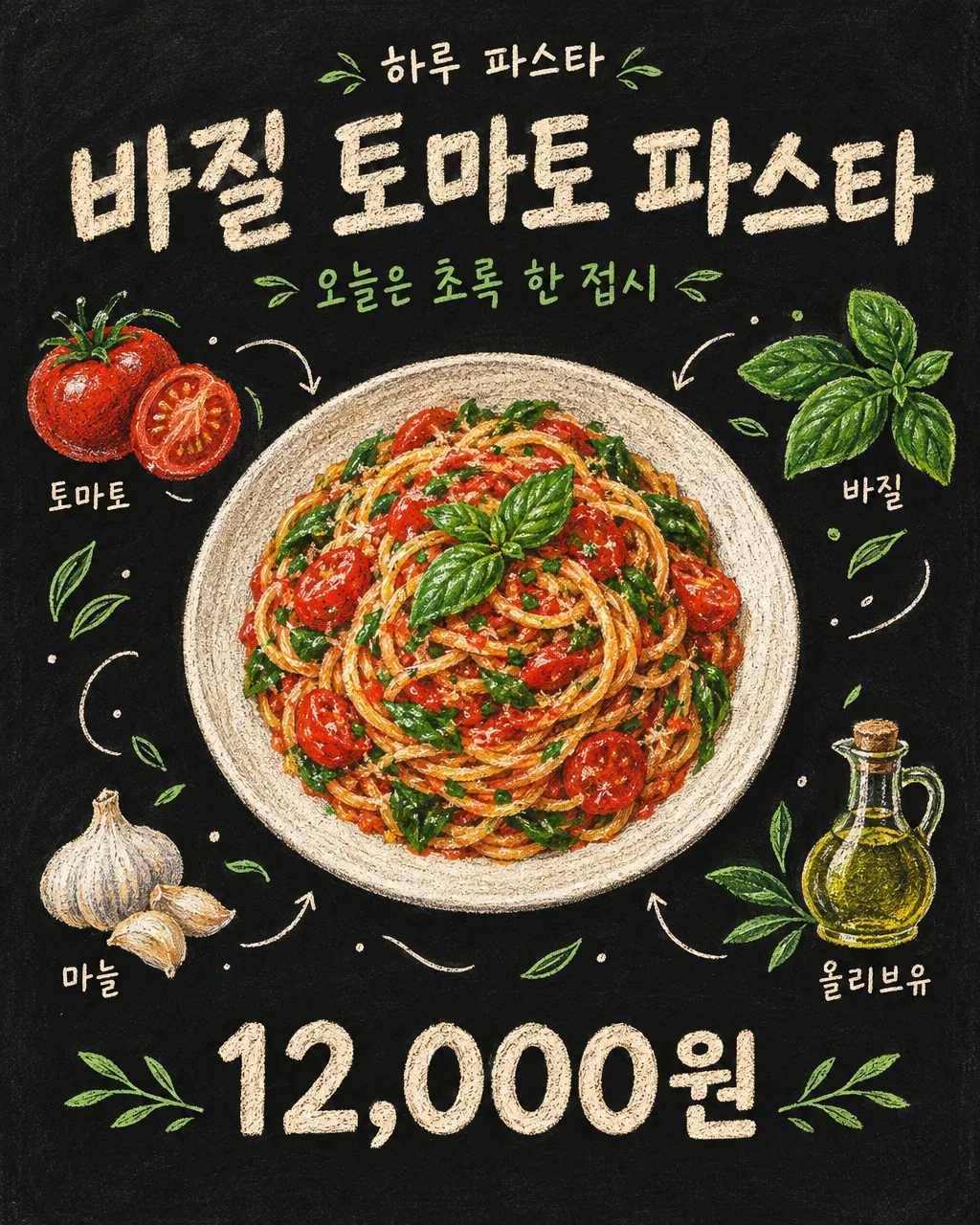
Draw large food and small ingredient illustrations on a chalkboard with chalk. A single page for cafe walls and social media uploads.
What you get
- Chalk Plate Poster
Fill in the fields
- 1Fill in the fields
- 2Copy the prompt
- 3Paste it into a GPT chat
- 4Send it as is and you get an image like the thumbnail example
- 5Attach a real photo that fits the card and it is used in the result: a background photo for background cards, a person or food photo for those cards Optional
Full prompt 4,155 characters
Generate this image now. Return exactly ONE complete image directly. Do not ask questions, browse for photos, return a plan or give a prompt instead of the image.

Output size 1080x1350 pixels, 4:5 portrait, Instagram standard.

[Input: values are the only facts and wording]
SHOP: "【Shop Name】"
MENU: "【Menu Name】"
INGREDIENTS: "【Ingredients in Illustration】"
COPY: "【Short Phrase】"
PRICE: "【Selling Price】"
PLATE: "【Plate Shape】"
FOOD_DETAIL: "【Bite Point】"
LABELS: "【Ingredient Name Display】"
UTENSIL: "【Cutlery Illustration】"

[Fixed card design]
Create a finished hand-drawn chalk food poster on a matte black chalkboard. The food is painstaking colored chalk and colored-pencil illustration, never a pasted photograph. A generous central serving occupies over half the canvas, viewed slightly from above, with believable volume, uneven ingredient shapes and visible dusty chalk grain. Respect PLATE and FOOD_DETAIL when supplied; otherwise choose a simple plate suited to MENU. Pasta is loose long strands and natural turns, not a rigid coil.
Around the dish, draw only the supplied INGREDIENTS as small separate illustrations, normally three to five. Connect the scene with thin cream chalk curves, tiny leaf marks, restrained dots and short arrows. Use cream lettering and two main colors from the food. Density comes from fine shading on the main dish and lighter outlines in the small drawings, never irrelevant desserts or a mass of extra words. If UTENSIL is not the absent choice, include one modest chalk drawing of that utensil; do not add food to it.
MENU is the largest hand-lettered title, SHOP a small line above, COPY a separate supporting line. PRICE, when present, is one bold clear number group at the bottom, preserving every character. In the show-labels choice, place the exact ingredient name once by each matching drawing. In the drawings-only choice omit all ingredient names but keep the drawings. Default is show-labels. Keep title and price clear of decoration. Visible words consist only of supplied SHOP, MENU, COPY, PRICE and the enabled ingredient names. Do not add promotional claims or origin/nutrition information.

[Button meanings, internal instructions only]
LABELS: "Show" means show ingredient labels; "Illustration only" means drawings without labels.
UTENSIL: "None" means none; "Fork" means fork; "Spoon" means spoon; "Chopsticks" means chopsticks.

[Missing inputs and finish]
An optional input line removed from this prompt is absent. Do not print its key, invent a substitute caption, ask for it or reserve an empty panel. Choose a fitting simple visual only where the fixed design explicitly permits an automatic default. Selected values alter content only; retain this card's single style and one composition. Every supplied visible string stays verbatim in its original script and currency, without translation. Ordinary automatic lettering, if explicitly allowed above, is English; internal English keys and button names are never captions.
Use the stated aspect ratio, adapting one coherent layout rather than stretching food or letters. Text-bearing posters keep important lettering within the central 16–83% of image height and 5–95% of width; extend food-related ornament, background, shadows or texture to the trim so these insets do not create empty bands. Keep all price digits and ingredient labels unobstructed. Text-free photographs fill the canvas naturally with their scene. No frame, phone, wall mockup, watermark or extra results.
No uploaded photo is needed: create a fictional food scene from these inputs. If a reference photo is attached, use it only for the stated food's visible shape and materials within this same drawing or photographic medium, without adding absent products or claiming exact portion preservation. Finish one image even when no photo is attached.

[Final output format]
Output size 1080x1350 pixels, 4:5 portrait, Instagram standard.
This selected output format takes priority over any fixed canvas size or aspect ratio elsewhere in this template. Adapt the composition, text zones and margins to the selected canvas without stretching or cropping essential content. Device safe areas apply only when a device is selected. Never print these format instructions on the image.
How did it turn out?
You may also like
How to use it · FAQ
Today's Menu on the Blackboard in a Single Image
This is a poster drawn with colored chalk featuring the loosely unspooled noodles of a basil pasta, a tomato cross-section, and a basil leaf. Surrounded by drawings of small ingredients and chalk lines around a large plate, it yields a hand-drawn look distinct from simply changing text on a menu board. It fits cafe walls, daily menu guides, and Instagram feeds. The black chalkboard and chalk art style are fixed, so you don't need to choose an art style.
Fill in the Four Boxes First
Write the shop name, menu name, ingredients to show in the illustration, and a short phrase. Ingredients are best as three to five items separated by commas, like 'tomato, basil, garlic, olive oil'. If unsure, tap the suggestion matching the menu and fix it to the actual ingredients. 'A Green Plate Today' is the single line below the title, and the menu name appears largest. Write the price with its unit like '12,000 KRW' when you want to show it. Leaving it blank removes the price and its slot.
Change the Plate and Appetizing Details Too
For the plate shape, write a single piece of tableware, such as 'low white porcelain bowl'. The bite-sized point is a visual feature like 'grilled chicken texture and crisp leaves'. Leaving it blank determines it to match the menu. Tapping the ingredient name display as 'Illustration only' keeps surrounding ingredients while removing small name tags. The cutlery illustration is a button to add a fork, spoon, or chopsticks, with the default being none. These boxes change only the drawing content while maintaining the chalk art style.
Paste and Read the Resulting Image
Once you fill in the boxes, copy the text and send it once to a GPT capable of image generation to request a single finished image. There is no need to hunt for photos or create a recipe first. Afterward, check if the menu and prices are accurate and if the names next to the ingredient illustrations appear only once. If strawberries or chocolate unrelated to pasta appear, fix that part by saying 'Draw only the four input ingredients around it.' Since food drawn without a photo is a virtual example, if you are using it to announce actual portions in store, verify it against your menu.