
All · Ads & posters · Restaurants · Cafés & desserts
242Doodle Food Pop Art
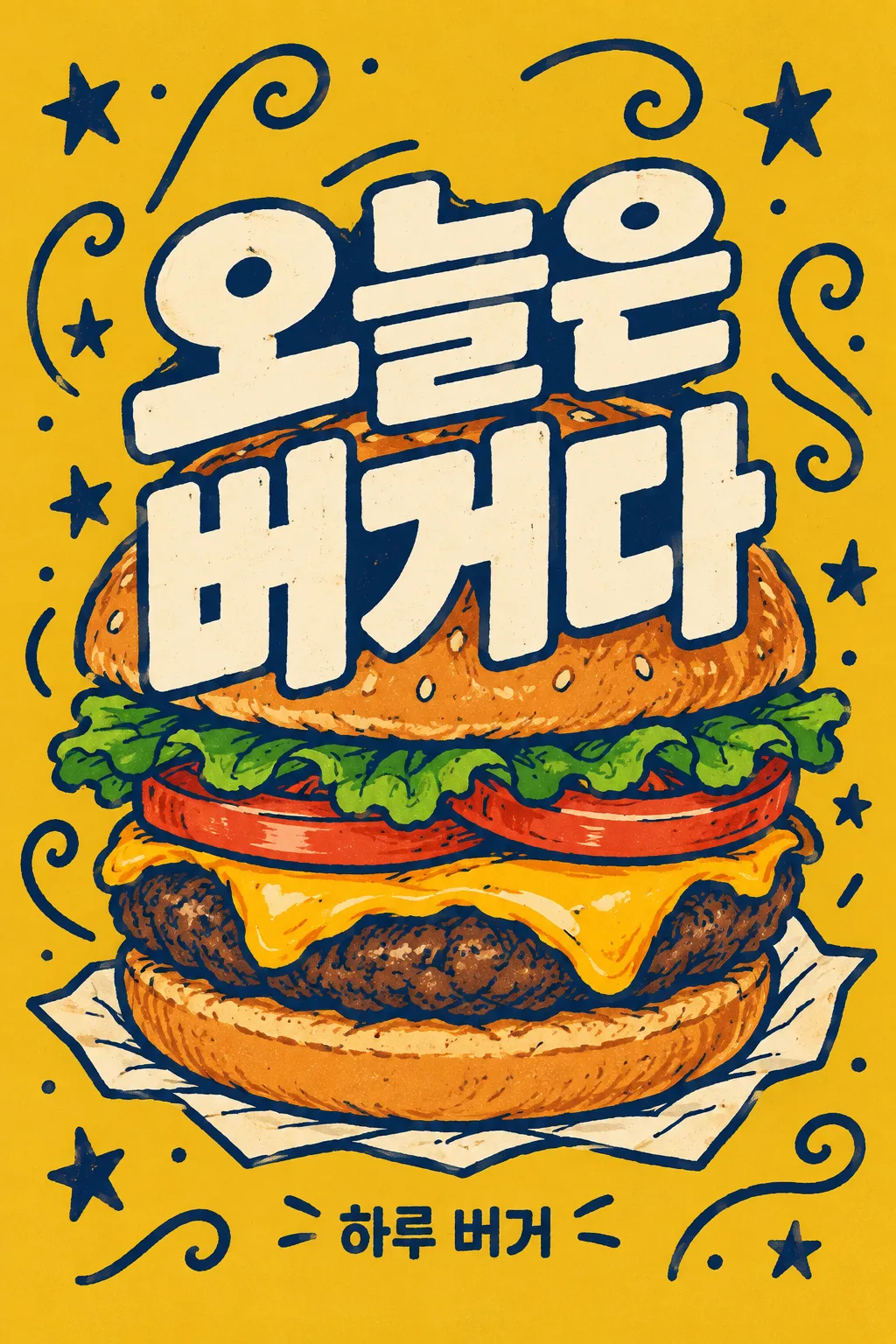
Overlap a two-line title on a large hand-drawn food illustration and fill the background with doodles. A distinctive feed poster for independent cafes.
What you get
- Doodle Food Pop Art
Fill in the fields
- 1Fill in the fields
- 2Copy the prompt
- 3Paste it into a GPT chat
- 4Send it as is and you get an image like the thumbnail example
- 5Attach a real photo that fits the card and it is used in the result: a background photo for background cards, a person or food photo for those cards Optional
Full prompt 4,153 characters
Generate this image now. Return exactly ONE complete image directly. Do not ask questions, browse for photos, return a plan or give a prompt instead of the image.

Output exactly one finished 2:3 portrait image, 1024x1536 pixels. Leave the top 12% and bottom 15% free of essential text.

[Input: values are the only facts and wording]
MENU: "【Menu】"
HEADLINE: "【Large Title】"
SHOP: "【Shop Name】"
BACKGROUND: "【Background Color】"
FOOD_DETAIL: "【Visible Ingredients】"
DOODLES: "【Peripheral Doodles】"
VESSEL: "【Food Base】"

[Fixed card design]
Create one independent-cafe pop-art print poster. Broad BACKGROUND color, deep navy hand-drawn outlines, warm cream letters and the natural dominant food colors. Render a large recognizable MENU in bold flattened color shapes and irregular ink lines, with small brush grain, no photo, 3D or glossy gradient. Use FOOD_DETAIL when supplied; otherwise the ordinary named food. The food occupies around 70% of the height. VESSEL is a believable small support, not an extra menu item.
HEADLINE has TWO intended lines: interpret either slash / or full-width slash / as a visual line break, never print a slash or translate or add words. The two cream lines are extremely bold, slightly irregular and tightly stacked over the middle of the food as a print-magazine cover. Keep letter cores and the defining food silhouette readable; the food can peek around and between letter shapes. SHOP appears once as a compact low line. MENU is a drawing instruction and is not repeated as another caption.
Fill the remaining backdrop with the selected DOODLES in one slightly darker outline color. Map its localized button value to stars and curling lines, forks and waves, or leaves and dots. The default is stars and curls. Vary sizes and spacing so the marks form a rhythm around the food; keep them out of letter counters and faces of ingredients. Density comes from the connected outlines and layering, with a clear oversized headline. No price, ingredient labels, filler English, health claims or unrelated food. Only the exact two HEADLINE lines and SHOP are visible text.

[Button meanings, internal instructions only]
BACKGROUND: "Mustard Yellow" means mustard yellow; "Coral Red" means coral red; "Olive Green" means olive green; "Deep Teal" means deep teal.
DOODLES: "Stars and squiggly lines" means stars and curling lines; "Forks and wave lines" means forks and waves; "Leaves and small dots" means leaves and dots.

[Missing inputs and finish]
An optional input line removed from this prompt is absent. Do not print its key, invent a substitute caption, ask for it or reserve an empty panel. Choose a fitting simple visual only where the fixed design explicitly permits an automatic default. Selected values alter content only; retain this card's single style and one composition. Every supplied visible string stays verbatim in its original script and currency, without translation. Ordinary automatic lettering, if explicitly allowed above, is English; internal English keys and button names are never captions.
Use the stated aspect ratio, adapting one coherent layout rather than stretching food or letters. Text-bearing posters keep important lettering within the central 16–83% of image height and 5–95% of width; extend food-related ornament, background, shadows or texture to the trim so these insets do not create empty bands. Keep all price digits and ingredient labels unobstructed. Text-free photographs fill the canvas naturally with their scene. No frame, phone, wall mockup, watermark or extra results.
No uploaded photo is needed: create a fictional food scene from these inputs. If a reference photo is attached, use it only for the stated food's visible shape and materials within this same drawing or photographic medium, without adding absent products or claiming exact portion preservation. Finish one image even when no photo is attached.

[Final output format]
Output exactly one finished 2:3 portrait image, 1024x1536 pixels. Leave the top 12% and bottom 15% free of essential text.
This selected output format takes priority over any fixed canvas size or aspect ratio elsewhere in this template. Adapt the composition, text zones and margins to the selected canvas without stretching or cropping essential content. Device safe areas apply only when a device is selected. Never print these format instructions on the image.
How did it turn out?
You may also like
How to use it · FAQ
A Poster Overlapping Food and Large Text
This is pop art where two lines reading 'Today is / a burger' overlap largely over a round burger's bun and cheese, while filling the remaining background with stars and squiggly lines. Flat colors and bold hand-drawn lines stand out more than photographic gloss. It fits independent cafe feeds, food event mood posts, and restaurant wall decor. It is a single image where large text and food are read as a single mass.
The Slash in the Middle of the Title is a Line Break
Fill out the menu, large title, and shop name first. The large title includes a slash between two short chunks, like 'Today is / a burger'. In the illustration, the slash is omitted and changes into two lines. The menu box is a term deciding what to draw, such as burger or pasta, and does not appear in the illustration as another menu title. After tapping the example title, check if the wording matches the current menu.
Boxes Changed Within the Same Pop Art
Choose the background color among mustard yellow, coral red, olive green, and deep teal. The color of the food itself remains the same. For visible ingredients, write ingredients that would be visible, such as bun, patty, cheese, tomato, and lettuce for a burger. Peripheral doodles are one set among stars and squiggly lines, forks and wave lines, or leaves and small dots. The food base can be changed by tapping paper, bowl, or cutting board suggestions, and even if left blank, a matching base for the menu is determined and completed.
Shrink Small and Read the Title
Paste the copied text into GPT once and receive a single image. Shrink the resulting image to the size of a phone list and read the two lines. If the doodles cover the base or the burger is unrecognizable, fix it by saying 'Keep the title strokes as is and show more of the food outline and cheese.' Stretching the title too long tends to make the hero of the illustration small, so it is better to keep the phrasing in the boxes short from the start. It suits distinctive social media expressions rather than store price announcements with prices and discount numbers attached.