
All · Ads & posters · Cafés & desserts · New products
240Fruit Ade Splash
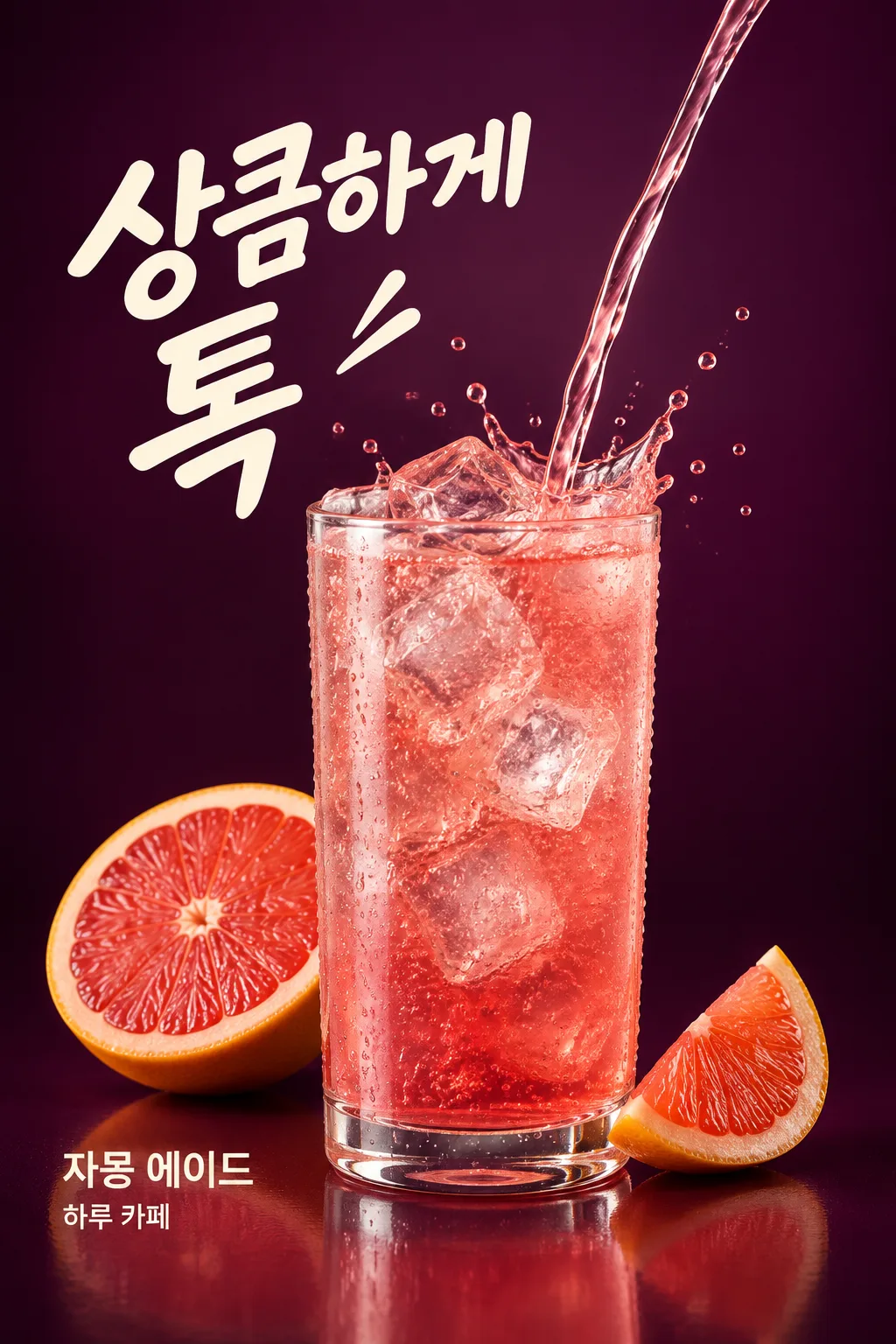
Freeze ade pouring into a glass along with ice and water droplets in a split second. A refreshing drink advertisement for new menu social media.
What you get
- Fruit Ade Splash
Fill in the fields
- 1Fill in the fields
- 2Copy the prompt
- 3Paste it into a GPT chat
- 4Send it as is and you get an image like the thumbnail example
- 5Attach a real photo that fits the card and it is used in the result: a background photo for background cards, a person or food photo for those cards Optional
Full prompt 4,241 characters
Generate this image now. Return exactly ONE complete image directly. Do not ask questions, browse for photos, return a plan or give a prompt instead of the image.

Output exactly one finished 2:3 portrait image, 1024x1536 pixels. Leave the top 12% and bottom 15% free of essential text.

[Input: values are the only facts and wording]
DRINK: "【Drink Name】"
DRINK_DETAIL: "【Drink Characteristics】"
SHOP: "【Shop Name】"
COPY: "【Large Phrase】"
FRUIT: "【Fruit to Draw】"
GLASS: "【Glass Shape】"
ICE: "【Ice Shape】"
BACKGROUND: "【Background Color】"
SPLASH: "【Splash Size】"

[Fixed card design]
Make a high-speed studio drink advertisement. One unbranded transparent glass in the chosen GLASS shape is fully visible in the lower center, filled with DRINK as described by DRINK_DETAIL. ICE specifies actual translucent ice geometry and wins if the detail sentence describes a different ice shape. A single narrow liquid stream enters the glass from the upper right and a crown-shaped splash and unequal droplets freeze around the rim. SPLASH changes only the reach of this liquid action, from energetic to a small rim splash; it never changes the number of glasses.
Render believable liquid thickness, transparent refraction, condensation on the glass and tiny bubbles only for a carbonated drink. All fluid is liquid, never a ribbon of solid crystal. Show only the FRUIT composition and count, close to the glass at the lower sides, with clear pulp and peel. No extra fruit, bottles or cans. Deep BACKGROUND color, smooth understated gradient, broad studio highlights and restrained rim light reveal the transparent material. Texture and moving liquid provide the richness, without fireworks or clutter.
Place COPY as one large cream headline at upper left, deliberately asymmetric. Place DRINK and SHOP as separate exact smaller word groups near the lower-left side of the glass; keep liquid and ice out of every letter. These three supplied strings are the only lettering. There is no price, sale badge, ingredient label or health claim. Fill the lower region with the glass, fruit and subtle reflection instead of a boxed information strip.

[Button meanings, internal instructions only]
GLASS: "Straight cylindrical glass" means straight cylindrical glass; "Low rounded glass" means low rounded glass; "Handled glass" means handled glass.
ICE: "Large cubed ice" means large cubes; "Finely crushed ice" means crushed ice; "Round ice" means round ice.
SPLASH: "Energetic" means energetic splash; "Small around the glass rim" means small rim splash.

[Missing inputs and finish]
An optional input line removed from this prompt is absent. Do not print its key, invent a substitute caption, ask for it or reserve an empty panel. Choose a fitting simple visual only where the fixed design explicitly permits an automatic default. Selected values alter content only; retain this card's single style and one composition. Every supplied visible string stays verbatim in its original script and currency, without translation. Ordinary automatic lettering, if explicitly allowed above, is English; internal English keys and button names are never captions.
Use the stated aspect ratio, adapting one coherent layout rather than stretching food or letters. Text-bearing posters keep important lettering within the central 16–83% of image height and 5–95% of width; extend food-related ornament, background, shadows or texture to the trim so these insets do not create empty bands. Keep all price digits and ingredient labels unobstructed. Text-free photographs fill the canvas naturally with their scene. No frame, phone, wall mockup, watermark or extra results.
No uploaded photo is needed: create a fictional food scene from these inputs. If a reference photo is attached, use it only for the stated food's visible shape and materials within this same drawing or photographic medium, without adding absent products or claiming exact portion preservation. Finish one image even when no photo is attached.

[Final output format]
Output exactly one finished 2:3 portrait image, 1024x1536 pixels. Leave the top 12% and bottom 15% free of essential text.
This selected output format takes priority over any fixed canvas size or aspect ratio elsewhere in this template. Adapt the composition, text zones and margins to the selected canvas without stretching or cropping essential content. Device safe areas apply only when a device is selected. Never print these format instructions on the image.
How did it turn out?
You may also like
How to use it · FAQ
The Moment of Pouring Becomes a Drink Advertisement
Create an illustration where transparent ice glows inside grapefruit ade, with liquid flowing into the glass and small water splashes frozen mid-air. With stronger movement than a menu photo featuring just a glass facing front, it suits cafe new menu feeds or seasonal drink posts. Showcasing a single drink and three pieces of text, it is completed as a price-free social media advertisement.
Write the Drink and Fruit Separately
For the drink name, write 'Grapefruit Ade', and for the drink characteristics, write colors and inner appearances like 'light ruby-colored carbonation, transparent ice'. Also fill in the shop name and large phrase. The shorter the large phrase, like 'Refreshing Pop', the easier it is to read next to the stream of water. For the fruit to be drawn, write the type, shape, and count together, such as 'one grapefruit half and one thin slice'. If it's lemon ade, you can change the drink name, characteristics, and fruit suggestions together.
Try Using the Glass, Ice, and Background Buttons
Choose one among a straight cylindrical glass, a low rounded glass, and a handled glass. Ice is either cubed ice, crushed ice, or round ice. If you also wrote ice in the drink characteristics, the ice button value takes priority. The background color can be chosen by tapping dark color suggestions or writing it directly. The splash size defaults to 'Energetic', and for a calm feed, you can choose 'Small around the glass rim'. The glass is always one in any selection.
Check the Glass and Liquid First
Paste the copied text once into a GPT capable of creating images to request a single drink advertisement. Image attachment is not required. From the result, check if the drinking glass is distorted or if the water streams look like stiff strings, and ensure the large phrase and water droplets do not overlap. If the ice looks opaque like a stone, request 'Enhance refraction and transparency inside the ice'. If the color, fruit, or glass differs from the actual drink sold, change it starting from the respective box to the actual composition.