

All · Infographics & guides · Store notices
025Pet Access Notice for a Shop
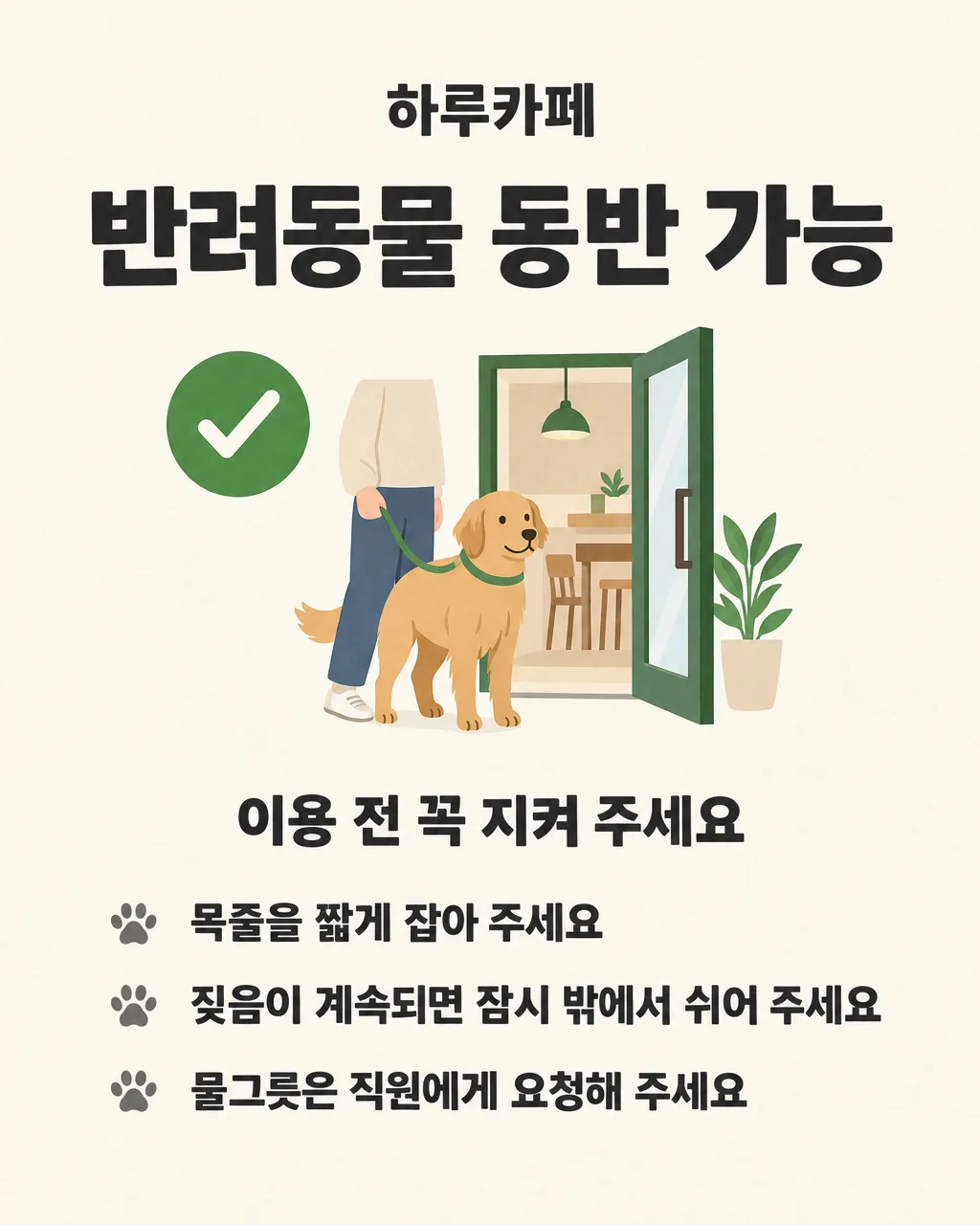
Show whether pets may enter and the three rules visitors need to follow.
Fill in the fields
- 1Fill in the fields
- 2Copy the prompt
- 3Paste it into a GPT chat
- 4Send it as is and you get an image like the thumbnail example
- 5Attach a real photo that fits the card and it is used in the result: a background photo for background cards, a person or food photo for those cards Optional
Full prompt 7,530 characters
Generate this image now. Draw it directly - do not describe it, explain it, or ask questions.
Output size 2480x3508 pixels, A4 portrait, 300dpi, print-ready poster.

[Purpose]
Create a finished English storefront notice for "【Shop name】" that tells customers the shop's exact pet-entry policy and three rules before they enter. The selected value "【Pet access】" is the controlling condition for the entire design. The headline wording, central icon, animal expression, doorway symbol, accent color, and emotional tone must all agree with that value. This is practical signage for a shop owner, not a cute pet advertisement. A person must understand the policy from several steps away before reading the smaller rules.

[Scene]
Use a clean warm-ivory paper background with generous margins and a simple vertical information hierarchy. At the top is the shop name. Below it is one large policy headline. In the center, draw one original, generic dog beside a simple storefront-door pictogram; add a small generic cat only if spacing allows. The animals must never resemble a known character, mascot, logo, celebrity pet, or branded illustration. Below the central symbol, place the three rules as three evenly spaced lines, each led by a small neutral paw-print bullet. Keep all functional text on open background with no plaques, ribbons, speech balloons, boxes, or decorative panels behind it.

Apply exactly one of these four conditional art directions according to "【Pet access】":
- If the value is "Allowed": render the exact headline "Pets welcome". Show an open doorway and a calm, gently smiling dog standing beside its guardian's simple leash hand. Use a green circular check icon. The pose is welcoming but orderly, not excited.
- If the value is "Carrier or stroller only": render the exact headline "Pets in carriers or strollers only". Show a calm dog safely inside a clearly recognizable closed pet carrier or pet stroller, with no loose animal walking through the doorway. Use a blue carrier icon with a small green check. Do not show confinement as sadness or punishment.
- If the value is "Patio only": render the exact headline "Pets on the patio only". Show a calm dog seated beside an outdoor table under a small patio awning; the indoor doorway stays behind a clear boundary line. Use a terracotta outdoor-table icon with a green check. Do not show the animal inside the shop.
- If the value is "Not allowed": render the exact headline "Pets are not allowed". Show a closed storefront doorway with a clear red no-pet pictogram. The dog stands outside beside its guardian, with a neutral, respectful expression and closed mouth: not smiling, waving, celebrating, entering, or looking invited. Use muted gray and restrained red accents. Never use a green check, open door, welcome gesture, happy entering pose, carrier-entry scene, or terrace-service scene for this value.

[Attached photo]
No attached photo is needed. If a photo is attached anyway, do not copy any logo, brand, character, person, or distinctive pet from it. Use only the original generic pictograms and animals described here. Do not add a QR code, delivery-app mark, certification mark, social-media logo, or third-party trademark.

[Text layout] top to bottom, as % of canvas height. Render these exact English strings:
- 5-10%: "【Shop name】" - small bold English sans-serif, dark charcoal, centered
- 13-25%: the one exact conditional headline required by the selected value "【Pet access】" - the largest heavy English sans-serif text, centered, maximum two lines; do not print the raw value separately
- 29-52%: conditional illustration and icon zone only, with no text
- 57-63%: "Please follow these rules" - medium bold English sans-serif, dark charcoal, centered
- 67-73%: "【Rule 1】" - bold English sans-serif, dark charcoal, left aligned after one small paw-print bullet
- 76-82%: "【Rule 2】" - bold English sans-serif, dark charcoal, left aligned after one small paw-print bullet
- 85-91%: "【Rule 3】" - bold English sans-serif, dark charcoal, left aligned after one small paw-print bullet

[Style]
A polished English small-business information poster with friendly editorial pictograms, crisp flat shapes, and restrained hand-drawn warmth. Use dark charcoal for all body text and warm ivory for the background. Let the selected policy control one accent palette: leaf green for "Allowed", clear blue plus a small green check for "Carrier or stroller only", terracotta plus a small green check for "Patio only", and muted gray plus restrained red for "Not allowed". Illustration details must serve comprehension. Keep the animal anatomically simple and generic, with no costume, exaggerated cartoon face, human behavior, or mascot styling. Paw bullets are tiny navigation marks, never decoration scattered around the page.

[Visual hierarchy]
First read: the conditional policy headline and its matching icon. Second read: the three requested rules. Third read: the shop name and supporting animal illustration. The policy must remain unmistakable even when viewed as a phone thumbnail. Make the conditional icon large enough to identify immediately, but keep it below the headline in importance. Maintain generous empty space between the policy block and the rules. All three rule lines must have equal visual weight and enough room for unrequested foreign-language text without squeezing, overlap, or edge cropping.

[Lighting and texture]
Use flat, even print-poster lighting with a very subtle recycled-paper grain. No photographic shadows, dramatic spotlight, glow, halo, neon, glass effects, metallic finish, or glossy 3D rendering. Colors should reproduce clearly on an ordinary color printer. Keep contrast strong and backgrounds quiet.

[Text rules]
Render only the exact English strings specified in [Text layout]. Select exactly one conditional headline; never show two or more policy alternatives and never print "【Pet access】" as an extra label. Copy "【Shop name】", "【Rule 1】", "【Rule 2】", and "【Rule 3】" character for character. Do not shorten, paraphrase, reorder, duplicate, or invent any sentence. Draw every English syllable with complete clean strokes. Do not add unrequested foreign-language text, phone numbers, web addresses, hashtags, legal claims, tiny filler text, labels inside icons, or punctuation that was not supplied. Keep every text line well inside the safe margins.

[Avoid]
any mismatch between selected policy, headline, icon, animal location, facial expression, or color; smiling, celebrating, waving, welcoming, entering, or open-door imagery when the value is "Not allowed"; loose indoor pet when the value is "Carrier or stroller only"; indoor pet when the value is "Patio only"; red prohibition symbol when the value is "Allowed"; displaying all four options like a menu; raw placeholder braces; misspelled or broken English; added rules; duplicated text; speech balloons; checklists with empty boxes; panels behind text; frames; clutter; excessive paw prints; cute mascot treatment; famous characters; celebrity likenesses; brand or delivery-app logos; QR codes; watermarks; product advertising; medical or behavioral claims; glowing edges; neon; 3D text; text outlines; heavy drop shadows

[Final output format]
Output size 2480x3508 pixels, A4 portrait, 300dpi, print-ready poster.
This selected output format takes priority over any fixed canvas size or aspect ratio elsewhere in this template. Adapt the composition, text zones and margins to the selected canvas without stretching or cropping essential content. Device safe areas apply only when a device is selected. Never print these format instructions on the image.
How did it turn out?
More cards in this category


How to use it · FAQ
Use this card in cafes, restaurants, salons, or accommodations where pet policies need to be clear at the entrance. Entering rules directly in the fields prevents customers from having to ask whether pets are allowed. Select one of the access levels—allowed, carrier/stroller only, patio only, or not allowed—and the visual cues will adjust to match. For instance, selecting 'not allowed' generates a closed door and neutral expressions rather than welcoming imagery, avoiding customer confusion. Print the final image in A4 and post it at eye level by your main entrance, or share the same graphic on digital notice boards so guests know your policy beforehand. Carefully review your shop's name, the access level, and all three rules word by word against your actual service standards before printing. If any text, icon, or policy status is incorrect in the generated preview, reply in the same chat with a concise correction, such as updating only the second rule or adjusting the door icon for a strict no-pet policy. Avoid modifying multiple unrelated sections at once, and regenerate in a fresh chat if the visual layout repeatedly conflicts with your rules.
Last checked · Published