
すべて · 広告・ポスター · カフェ・スイーツ · 新商品
240フルーツエイドスプラッシュ
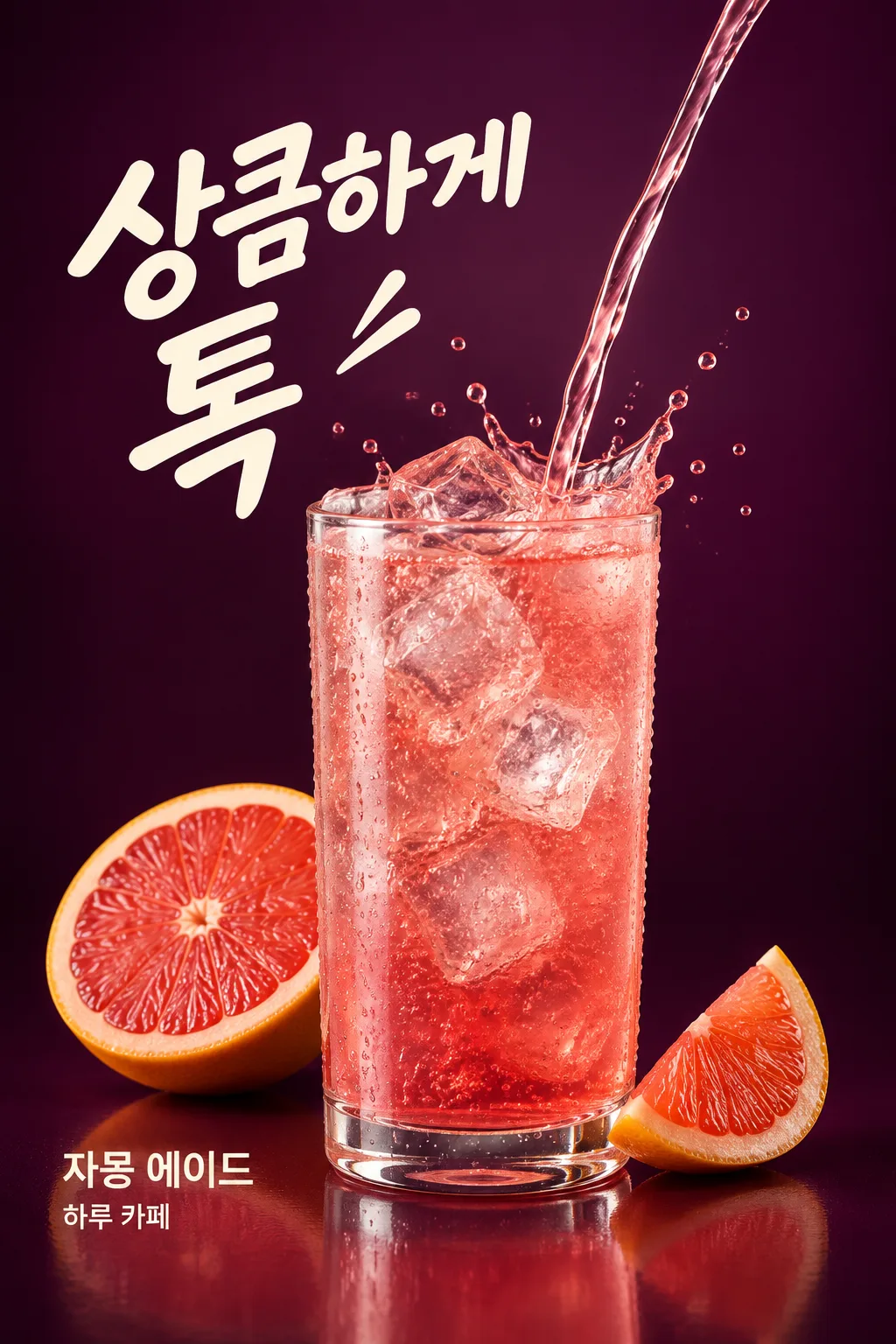
グラスに注がれるエイドと氷・水滴をひと瞬間に止めます。新メニューのSNSに使う爽やかなドリンク広告です。
受け取れるもの
- フルーツエイドスプラッシュ
項目を入力
- 1項目を入力します
- 2コピーを押します
- 3GPTのチャットに貼り付けます
- 4そのまま送ると、サムネイルの例のような画像になります
- 5カードに合う実際の写真を一緒に入れると反映されます。背景カードなら背景の写真、人物・料理カードならその写真 任意
プロンプト全文を見る 4,097文字
Generate this image now. Return exactly ONE complete image directly. Do not ask questions, browse for photos, return a plan or give a prompt instead of the image.

完成した2:3の縦型画像を1枚、1024×1536ピクセルで出力してください。重要な文字は上12%と下15%に置かないでください。

[Input: values are the only facts and wording]
DRINK: "【ドリンク名】"
DRINK_DETAIL: "【ドリンクの特徴】"
SHOP: "【店名】"
COPY: "【大きなフレーズ】"
FRUIT: "【描くフルーツ】"
GLASS: "【グラスの形】"
ICE: "【氷の形】"
BACKGROUND: "【背景色】"
SPLASH: "【水しぶきの大きさ】"

[Fixed card design]
Make a high-speed studio drink advertisement. One unbranded transparent glass in the chosen GLASS shape is fully visible in the lower center, filled with DRINK as described by DRINK_DETAIL. ICE specifies actual translucent ice geometry and wins if the detail sentence describes a different ice shape. A single narrow liquid stream enters the glass from the upper right and a crown-shaped splash and unequal droplets freeze around the rim. SPLASH changes only the reach of this liquid action, from energetic to a small rim splash; it never changes the number of glasses.
Render believable liquid thickness, transparent refraction, condensation on the glass and tiny bubbles only for a carbonated drink. All fluid is liquid, never a ribbon of solid crystal. Show only the FRUIT composition and count, close to the glass at the lower sides, with clear pulp and peel. No extra fruit, bottles or cans. Deep BACKGROUND color, smooth understated gradient, broad studio highlights and restrained rim light reveal the transparent material. Texture and moving liquid provide the richness, without fireworks or clutter.
Place COPY as one large cream headline at upper left, deliberately asymmetric. Place DRINK and SHOP as separate exact smaller word groups near the lower-left side of the glass; keep liquid and ice out of every letter. These three supplied strings are the only lettering. There is no price, sale badge, ingredient label or health claim. Fill the lower region with the glass, fruit and subtle reflection instead of a boxed information strip.

[Button meanings, internal instructions only]
GLASS: "ストレートな円柱グラス" means straight cylindrical glass; "低い丸グラス" means low rounded glass; "取っ手付きグラス" means handled glass.
ICE: "大きな角氷" means large cubes; "細かく砕いた氷" means crushed ice; "丸い氷" means round ice.
SPLASH: "勢いよく" means energetic splash; "グラスの周りに小さく" means small rim splash.

[Missing inputs and finish]
An optional input line removed from this prompt is absent. Do not print its key, invent a substitute caption, ask for it or reserve an empty panel. Choose a fitting simple visual only where the fixed design explicitly permits an automatic default. Selected values alter content only; retain this card's single style and one composition. Every supplied visible string stays verbatim in its original script and currency, without translation. Ordinary automatic lettering, if explicitly allowed above, is Japanese; internal English keys and button names are never captions.
Use the stated aspect ratio, adapting one coherent layout rather than stretching food or letters. Text-bearing posters keep important lettering within the central 16–83% of image height and 5–95% of width; extend food-related ornament, background, shadows or texture to the trim so these insets do not create empty bands. Keep all price digits and ingredient labels unobstructed. Text-free photographs fill the canvas naturally with their scene. No frame, phone, wall mockup, watermark or extra results.
No uploaded photo is needed: create a fictional food scene from these inputs. If a reference photo is attached, use it only for the stated food's visible shape and materials within this same drawing or photographic medium, without adding absent products or claiming exact portion preservation. Finish one image even when no photo is attached.

[Final output format]
完成した2:3の縦型画像を1枚、1024×1536ピクセルで出力してください。重要な文字は上12%と下15%に置かないでください。
This selected output format takes priority over any fixed canvas size or aspect ratio elsewhere in this template. Adapt the composition, text zones and margins to the selected canvas without stretching or cropping essential content. Device safe areas apply only when a device is selected. Never print these format instructions on the image.
結果はどうでしたか?
こちらのカードも人気です
使い方・よくある質問
注ぐ瞬間がドリンク広告になる
グレープフルーツエイドに透明な氷が透けて見え、グラスの中へ流れる液体と小さな水しぶきが空中で止まっているイラストを作ります。正面にグラスだけを置いたメニュー写真よりも動きが強く、カフェの新メニューのフィードや季節のドリンクの投稿によく合います。1杯のドリンクと3つの文字だけを表示し、価格のないSNS広告として完成させます。
ドリンクとフルーツを分けて書く
ドリンク名は「グレープフルーツエイド」、ドリンクの特徴は「薄いルビー色の炭酸、透明な氷」のように色と中身の様子を書きます。店名と大きなフレーズも埋めます。大きなフレーズは「爽やかに弾ける」のように短いほど水流の横で読みやすくなります。描くフルーツには「グレープフルーツ半分と薄いスライス1枚」のように種類と形、個数を一緒に書きます。レモンエイドならドリンク名・特徴・フルーツの候補を一緒に変更すればよいです。
グラス・氷・背景のボタンを使ってみましょう
ストレートな円柱グラス・低い丸グラス・取っ手付きグラスの中から1つを選びます。氷は角氷・クラッシュアイス・丸い氷のいずれかです。ドリンクの特徴にも氷を書いた場合、氷のボタンの値が優先されます。背景色は暗い色の候補を押すか、直接書きます。水しぶきの大きさは「勢いよく」が基本で、落ち着いたフィードなら「グラスの周りに小さく」を選べばよいです。グラスはどの選択でも1つです。
グラスと液体を最初に確認する
コピーした文章を画像が作れるGPTに一度貼り付けると、ドリンク広告を1枚リクエストします。画像の添付は必要ありません。結果からグラスが歪んでいないか、水流が固い紐のように見えていないか、大きなフレーズと水滴が重なっていないかを確認してください。氷が石のように不透明なら「氷の中の屈折と透明感を生かして」とリクエストしてください。実際に販売しているドリンクと色・フルーツ・グラスが異なる場合は、該当する欄から実際の構成に変更してください。