
전체 · 인포그래픽/안내 · 매장 안내문
389리뷰 이벤트 안내 — 혜택과 세 동작을 한눈에
리뷰 작성 혜택과 사진 촬영·리뷰 작성·직원 확인의 세 동작을 큰 글자와 그림으로 안내하는 계산대·테이블용 인쇄물
ChatGPT 무료 OK
칸 채우기
- 1칸을 채워요
- 2복사 버튼을 눌러요
- 3GPT 채팅창에 붙여넣어요
- 4그대로 보내면 썸네일 예시처럼 나와요
- 5카드에 맞는 실제 사진을 같이 넣으면 그 사진이 반영돼요 — 배경 카드는 배경 사진, 인물 · 음식 카드는 그 사진 선택
프롬프트 원문 보기 3,077자
Generate this image now. Draw it directly, do not explain or ask questions.
Create ONE finished flat shop review event sign. Output exactly one finished 2:3 portrait image, 1024x1536 pixels. Keep all important text inside the central 73% of image height: leave the top 12% and bottom 15% free of essential lettering. Use the selected canvas ratio. Edge-to-edge ivory canvas, bold rounded sans lettering, thick outlines and peach hands, cheerful professional instructional illustration. No mockup, photographed paper or perspective. Top 12% and bottom 15% are decorative bands without text. Keep all words between 13% and 84% height, within 5% side margins. Small shop at 14%, title at 19%, large benefit at 25%-35% with a small original benefit icon. Three compact rounded horizontal rows at 40%-73%: numbered circle left, large instruction middle, meaningful action illustration right. Row1 hand holding a fictional phone photographing a shop item; row2 hand typing on generic phone with text lines; row3 customer hand showing phone to a staff member's hands. No faces, stars, ratings, recognizable app UI, logos, brand products or QR codes. Phones and benefit objects must be original fictional designs. Draw simplified icons, not realistic food photos.
Print platform at 77%, optional condition at 81%, impartiality note at 84%. Copy supplied shop, benefit, platform and condition exactly. The benefit heading is FIXED_TRIGGER followed by BENEFIT, never infer a benefit, price, period or eligibility. Blank shop removes its label and reflows header. Blank benefit omits the entire benefit panel including trigger and icon; never invent a free item. Blank platform omits its line, leaving no empty box. Blank condition omits its line, leaving no empty box. Draw the supplied benefit item; if it is a service, use an appropriate generic service icon. Color options in order orange/ivory, green/ivory, navy/ivory, black/white. Blank color uses orange/ivory. The palette never prints. Same layout and illustration style for all choices.
Reviews must be eligible regardless of content or rating. Never print or illustrate a minimum rating or a positive-review requirement. If input requests such a requirement, omit only that requirement and keep the neutral event. Use only generic platform wording; replace any supplied proprietary platform name with DEFAULT_PLATFORM, with no logo. Always print FIXED_NOTE. Print ONLY resolved shop, fixed title, fixed trigger if benefit exists, benefit, numbered steps 1-3, platform if supplied, condition if supplied and fixed note. Check every character before finishing. No verification notes, watermark or sample label.
SHOP: "【가게 이름】"
BENEFIT: "【혜택】"
PLATFORM: "【리뷰 경로】"
CONDITION: "【작은 안내】"
COLOR: "【색】"
Output language: ko. Title: 리뷰 이벤트. FIXED_TRIGGER: 리뷰 작성 시. Steps: 사진 찍기 / 리뷰 쓰기 / 직원에게 보여 주기. FIXED_NOTE: 내용과 평점에 관계없이 제공. DEFAULT_PLATFORM: 지도 앱 리뷰.

[Final output format]
Output exactly one finished 2:3 portrait image, 1024x1536 pixels. Keep all important text inside the central 73% of image height: leave the top 12% and bottom 15% free of essential lettering.
This selected output format takes priority over any fixed canvas size or aspect ratio elsewhere in this template. Adapt the composition, text zones and margins to the selected canvas without stretching or cropping essential content. Device safe areas apply only when a device is selected. Never print these format instructions on the image.
결과 어땠어요?
이 카드도 많이 사용해요
쓰는 법 · 자주 묻는 것
계산대나 테이블에 세워 두는 리뷰 이벤트 안내판 한 장입니다. 큰 혜택 문장 아래에 사진 찍기, 리뷰 쓰기, 직원에게 보여 주기의 세 동작을 손과 휴대전화 그림으로 안내합니다. 사진을 첨부하지 않아도 완성할 수 있으며, 완성된 프롬프트를 그림 AI에 한 번 붙여 넣으면 안내판 한 장을 요청합니다. 사진 변환 카드는 아니므로 고객 사진을 넣을 필요가 없습니다.
꼭 칸은 혜택 1개입니다. 가게 이름에는 실제 간판 이름을 적고 비우면 이름 줄이 사라집니다. 혜택에는 ‘음료 한 잔 서비스’처럼 실제 제공하는 내용만 적으세요. ‘리뷰 작성 시’는 자동으로 붙으므로 혜택 칸에는 그 문장을 반복하지 않습니다. 혜택을 비우면 문장과 아이콘 전체가 빠지며 무료 상품을 임의로 만들지 않습니다. 보기에는 음료 한 잔, 음료 한 캔, 포장 서비스가 있으며 다른 실제 혜택도 쓸 수 있습니다.
리뷰 경로는 ‘지도 앱 리뷰’ 또는 ‘배달 앱 리뷰’처럼 일반 명칭으로 적습니다. 비우면 경로 줄이 빠집니다. 특정 서비스 이름이나 로고를 그리는 대신 사장님이 일반 경로를 직접 지정하는 칸입니다. 작은 안내에는 ‘주문당 1회’, ‘구매 고객 대상’ 같은 실제 운영 조건을 짧게 적으며 비우면 조건 줄이 빠집니다. 평점이나 긍정적인 내용은 혜택 조건으로 삼지 않습니다. 입력에 그러한 요구가 있어도 해당 요구는 제외하며, ‘내용과 평점에 관계없이 제공’은 항상 표시합니다.
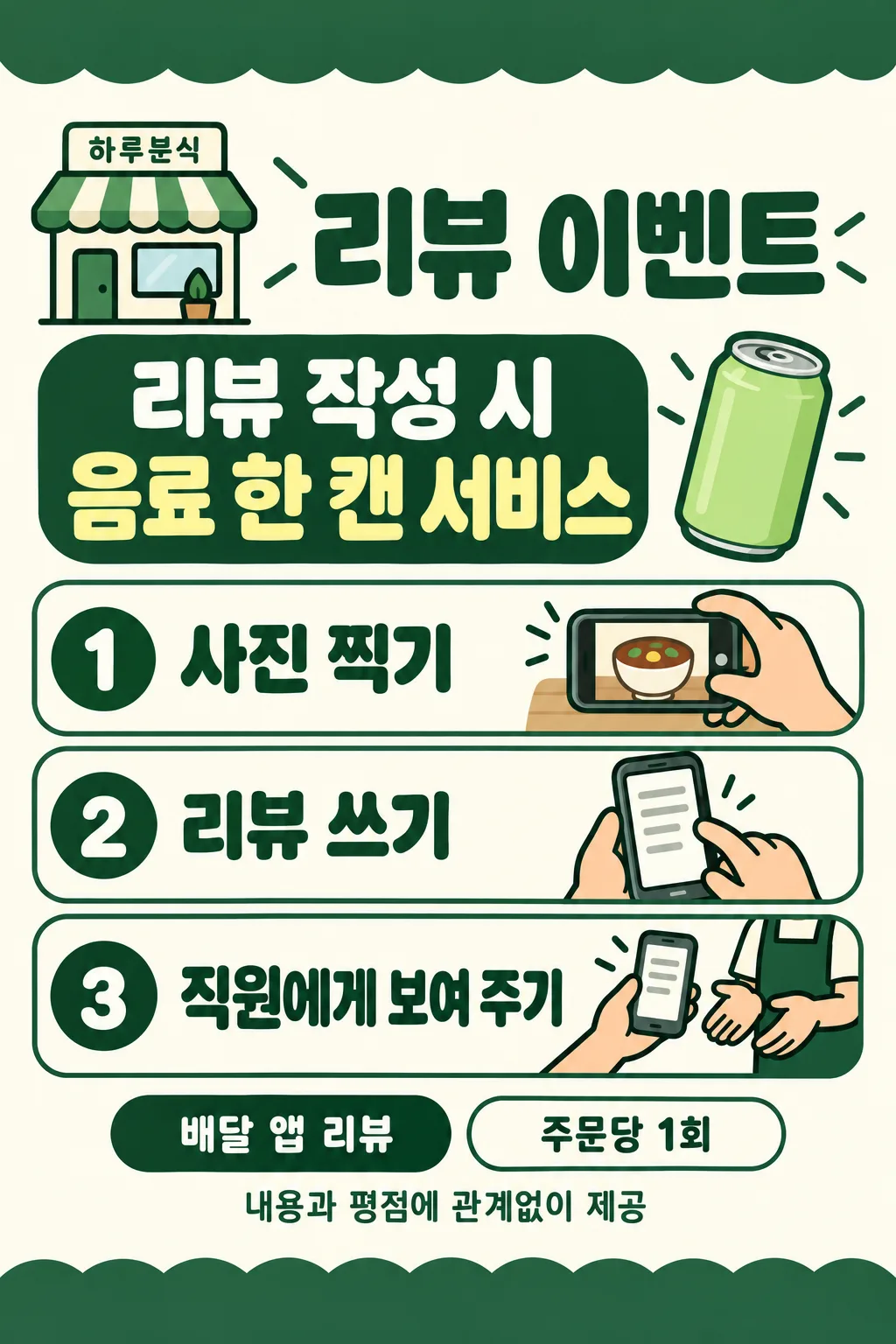
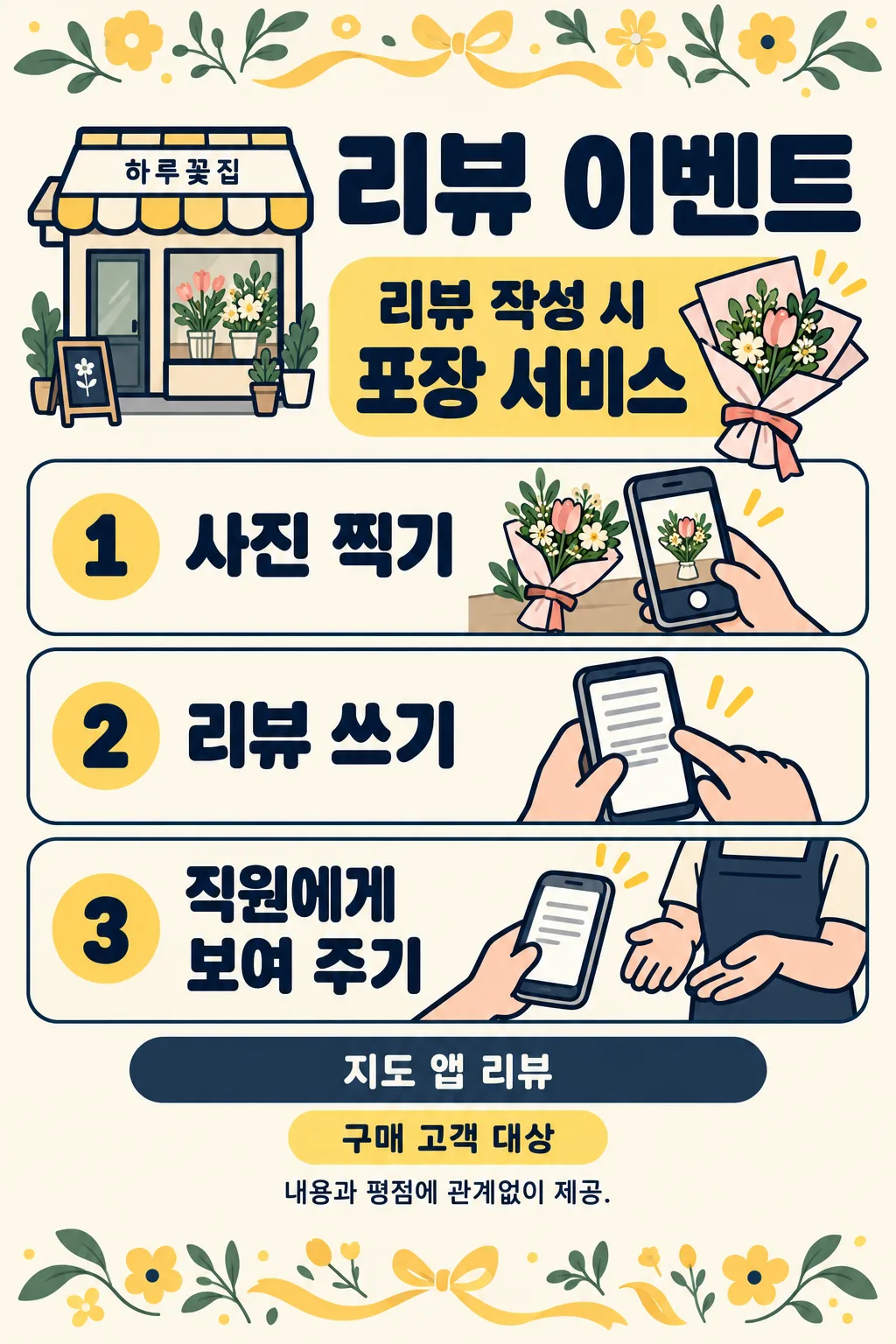
색은 주황·아이보리, 초록·아이보리, 남색·아이보리, 검정·하양 네 가지입니다. 비우면 주황을 사용합니다. 색만 바뀌며 세 단계와 평면 그림체는 같습니다. 표지는 하루커피의 음료 한 잔 서비스와 지도 앱 리뷰, 작은 안내 없음으로 만들었습니다. 갤러리 첫 장은 하루분식·음료 한 캔 서비스·배달 앱 리뷰·주문당 1회·초록이고, 둘째는 하루꽃집·포장 서비스·지도 앱 리뷰·구매 고객 대상·남색입니다. 세 장은 별도로 생성한 결과이며 사진이나 표지를 재사용한 예시가 아닙니다.
출력 후 가게 이름, 혜택의 수량, 리뷰 경로, 실제 조건을 원문과 한 글자씩 비교하세요. 번호가 1·2·3 순서인지, 마지막 그림이 작성한 화면을 직원에게 보여 주는 동작인지 확인합니다. 별 모양이나 특정 앱 화면이 끼어들면 다시 생성하세요. 보상을 받은 리뷰에 표시가 필요한지와 인센티브 리뷰가 허용되는지는 이용할 플랫폼의 현재 정책을 확인한 뒤 운영하세요. 이 안내판 자체가 모든 플랫폼에서 이벤트를 허용한다는 뜻은 아닙니다.
인쇄 비율은 공통 비율에서 선택하며 표지와 갤러리는 2:3입니다. 다른 비율로 출력할 때 글자를 잘라 채우지 말고 원래 비율을 유지하세요. 작은 안내가 읽히는지 시험 인쇄하고, 실제 테이블 거리에서 혜택과 세 단계를 읽어 보세요. 글자가 틀리면 원문을 확인해 다시 생성한 정확한 결과만 사용합니다.
혜택만 바꿀 수 있나요? 실제 혜택을 바꾸면 큰 문구와 관련 작은 아이콘이 달라집니다. 단계를 바꿀 수 있나요? 이 카드의 세 단계는 고정입니다. 가게 이름 없이 쓸 수 있나요? 비우면 공용 안내판으로 만듭니다. 영어·일본어는 같은 다섯 칸, 네 가지 색, 필수 칸 수와 빈칸 동작을 유지하며 해당 언어로 출력합니다.